ETc|'s WOLFENSTEIN ENEMY TERRITORY MASTER SERVER BROWSER






| Date: | Tue Feb 10 20:43:00 UTC 2026 |
| UUID: | git |
| Revision: | b861fb79 |
| Grade: | development |
Copyright © 2005-2007 discord.etclan.de
Table of Contents
List of Figures
List of Tables
First and foremost, thanks for taking the time out to give this mod a try. There are many other Wolfenstein: Enemy Territory® modifications out on the internet nowadays with the release of the SDK. This started as a project to just have a little fun and explore how the code of a great game works, but it turned into much more after my clan’s game server kept experiencing instability with the popular Shrubmod.
I hope you have fun with this mod, as this is its intention. | ||
| --Jaybird | ||
Table of Contents
“ The cost of adding a feature isn't just the time it takes to code it. The cost also includes the addition of an obstacle to future expansion. ... The trick is to pick the features that don't fight each other. ” | ||
| --John Carmack | ||
This guide is intended for anyone who runs or is interested in running a xmod 2.0.0 server.
Although ET is available on several platforms, Linux will be used as the reference platform for this documentation. Many concepts here apply equally to OSX and, to some degree, more generically to the Windows platform.
It is assumed the reader is sufficiently familiar with Linux administration to be able to perform basic operating system tasks.
Linux command syntax appears in monospace font prefixed with a typical shell prompt denoting account/privileges for which the command should be entered with, followed by a number sign (#) or dollar sign ($) indicating root or non-root accounts, respectively. Do not enter the prompt text as part of the command.
![[Note]](/xmod/images/note.png) | Note |
|---|---|
| The assumed Linux shell is bash. |
ET console command syntax appears in monospace font prefixed with a typical console prompt, a right-bracket (]). Do not enter the prompt text as part of the command.
Table 1. Syntax Conventions
| Convention | Description |
|---|---|
| braces {} | Braces indicate required items. |
| brackets [] | Brackets indicate optional items. |
| ellipses ... | Ellipses indicate an arbitrary number of similar items. |
italics | Italic style indicates a variable. Substitute a real value for the variable. |
| vertical bar | | A vertical bar indicates a choice within braces or brackets. |
Table of Contents
xmod is an add-on modification to Wolfenstein: Enemy Territory. The idea for xmod came from the main features of Shrubmod. Shrubmod has long been out of date and unsupported, and with the instability issues that come with Shrubmod, something had to be done to get a Shrub-like server-side mod that would provide most of the features, be stable, and be supported.
This mod has long since far outgrown its original objectives and has moved on to implement more advanced features with client-side support. To keep things as simple as possible, only one pak file needs to be downloaded (on the fly) for clients connecting to a xmod server for the first time.
With most of the Shrubmod compatibility implementation complete, the focus has shifted to the requests of the community, many of which mirror features already implemented in ETPro. This mod is becoming a rather well-rounded game play mod as a result. It is seeing more and more options that might be deemed competition-minded while maintaining its fun factor for pub environments.
xmod is a closed source project originally forked from the ET SDK. In mid-2006 the entire code base was converted to compile cleanly in C++ . Some ET SDK and all major xmod subsystems have been refactored/implemented to take full advantage of C++ language features.
xmod is available for download at its official home discord.etclan.de. You may find versions available elsewhere on the internet, but if at all possible download it from the official homepage, as it always has the most up-to-date version available.
If there is anything that isn’t answered here, I urge you to visit the website at discord.etclan.de for updated information, as it’s more likely to have information not available at the time this document was published.
Also, I’m always on the lookout for good ideas or suggestions, so, again, please visit the website and let me know what you think!
Table of Contents
Table of Contents
You have the ability to share adrenaline with other players. If you switch to the alternate weapon of the adrenaline syringe (usually right click on the mouse), the syringe will point outwards and you can give a live teammate adrenaline. This is an excellent way to promote teamwork in tough situations. This feature is enabled on the server using g_medics(cvar).
HUD is an acronym for Heads Up Display. This is the 2D layout of items are on your screen such as what weapon you’re holding, your compass, how much XP and health you have, etc. xmod has an alternative HUD available to use that takes up less screen space. This setting is available on the client using the in-game xmod preferences menu.
Automatic Rate Adjustment tunes the /rate setting to help deal with big servers running large maps with many players which will help to offer a better gaming experience. If the rate is ramped, it will only be ramped for the current map to avoid entering other servers with a rate which may get you kicked. In all cases, /rate ramping can only increase as high as the server's sv_maxrate setting.
If xmod detects that you have the highest normal /rate setting of 25000 and Auto Rate is set to "auto step" under the Xmod/Misc/Network menu, /rate will be raised in increments of 1000 when the server detects network congestion in the server -> client direction.
If Auto Rate is set to "server max" then /rate will be increased in a similar fashion as "auto step" except that instead of increasing in increments of 1000 it will simply increase all at once and match sv_maxrate.
Class stealing allows a player to steal a dead teammate’s class. This feature is enabled on the server using g_covertops(cvar).
In order to steal a class, you stand over a dead teammate and hold your activate key, much as you would steal a uniform as a covert ops. When you finish stealing their class, you lose your class abilities and your current weapons. You will gain the weapon the dead player was using (on an empty clip, you must find ammo!) and all the abilities of their class.
![[Tip]](/xmod/images/tip.png) | Tip |
|---|---|
| If the server administration has enabled it, when you are a disguised covert ops and steal a class, you keep the disguise even though you aren’t a covert ops anymore. |
Corpse dragging allows a player to drag a dead body (awaiting Medic revive) along the ground while depressing the activate-key. This feature is enabled on the server using g_dragCorpse(cvar).
| Tip |
|---|---|
| Use this to drag a teammate's body away from danger, or drag a dead enemy to a safe place for uniform stealing. |
Double jump allows you to jump an extra time while in mid-air to gain more height. This feature is enabled on the server using g_misc(cvar).
Alluding to the Mario Bros. days you can “goomba” kill people by landing on their heads. The farther you fall, the more damage you inflict. Also, if you land on someone’s head, it softens your fall. This feature is enabled on the server using g_goomba(cvar).
This extremely popular feature makes a sound when you hit a player. This feature is enabled on the client using the in-game xmod preferences menu.
The sound distinguishes between friendly/enemy hits, and depending on the server setting g_hitmode(cvar), the general body-part of player being hit.
The game keeps track of player kills and presents Unreal-Tournament-like killing spree messages and sounds. This feature is enabled on the client using the in-game xmod preferences menu. This feature must also be enabled on the server using g_killingSpree(cvar).
Covert-Ops can sneak behind someone and steal the pants right off of them! You must stay behind the player though. This feature is enabled on the server using g_covertops(cvar).
By default, death messages (obituaries) will show up on the left-middle part of your screen. On larger servers where there are a lot of deaths, it may be desirable to relocate those messages to the chat area. This setting is available on the client using the in-game xmod preferences menu.
Panzer war is a fun game-play mode made for destructionists. This feature is enabled on the server using g_panzerWar(cvar).
When enabled, the following is in effect:
| Note |
|---|---|
| This is a fun game mode and as such, it may not be compatible with the objectives of most maps. |
![[Warning]](/xmod/images/warning.png) | Warning |
|---|---|
| This feature is mutually exclusive to g_knifeonly(cvar), and g_sniperWar(cvar). |
A popular Shrubmod feature, playdead is enabled on the server using g_playDead(cvar).
Playdead allows a player to fake being dead in the hopes an attacker will give them no further attention and kindly move on. You can use this feature by binding a key for it in the in-game xmod menu under Misc. The key you specify will toggle playdead mode.
When you are in playdead mode, you cannot shoot your weapon. To an enemy, you look like a dead player (after a tap-out and awaiting a respawn). However, you will still be a solid body (players cannot walk through you) and your eyes will still blink.
| Note |
|---|---|
| Note that this version of playdead is a bit less bugged than Shrubmod’s version. It’s much harder to get stuck in walls, and there’s just about zero chance of someone using this as an exploit to get through a wall (example, bank doors on Goldrush) due to extra checks to make sure there is enough clearance for your player to fall down and still be in the “world”. |
| Tip |
|---|---|
| This is an excellent way to infiltrate enemy bases and maintain the element of surprise! |
Private messaging allows one player to send a private message to another player or group of players on the same server. This feature is enabled on the server using g_privateMessages(cvar).
To use this feature, simply go into the Misc section of the xmod menu, and bind a key to use it. You may also use private messages through the console or global chat window, but this method is deprecated and discouraged.
You can find a player’s slot number by using the admin command !listplayers or the builtin command /players in your client console. This is the best way to make sure only one specific individual receives your message.
You can also specify a partial name match. This is a shorthand way, but also allows for multiple people to receive the message. For example, sending a message to “dam” will send the message “hello!” to players “Adam” and “Damage”, since they both have “dam” in their name. Just be careful that you don’t make the partial name too generic or you might send your message to someone unintended!
There is also the option to block Private Messages. With Admin System enabled, anyone who is equal to your level or lower will be unable to send you a Private Message if you are blocking them. Anyone above you, however, will still be able to do so. This allows server admins to use Private Messaging as a valuable tool. You can find this option also in the in-game xmod menu.
Poison syringes are added to weapon slot #4 (behind grenades). It is a blue colored syringe that you can poke enemies with (or friendlies when friendly-fire enabled). When poked with a poison syringe, your view will start swaying back and forth, and get distorted. You can hear your heart pounding. Better find help. This option is enabled on the server using g_poisonSyringes(cvar).
Compounding effect - that is, if you are poked multiple times, you loose health faster. This allows XP sharing with poison hits – if you poke someone with a poison syringe, you will get XP for every time damage is dealt until they die. The interval of time that your syringe damages the player is 1.5 seconds, so every 1.5 seconds you will get 0.2 Medic XP and hurt the player 10HP. Since it tracks multiple people hitting the player with a Poison Syringe, the last poison damage inflicted that causes the death of the player gives the person who hit them with the specific syringe that caused the death a final 3 Medic XP.
Poisoned players can be cured with health packs. However, in an effort to make the game more balanced, medics cannot self-antidote. Essentially, a player can antidote themselves by finding a health pack that is not their own. Since poison compounds, you must find a health pack for each time you have been poisoned. For example, if you have been poked 4 times with a syringe, you must find 4 health packs.
| Tip |
|---|---|
| Health cabinets provide a good source of health packs. |
Sniper war is a fun game-play mode made for sharpshooters. This feature is enabled on the server using g_sniperWar(cvar).
When enabled, the following is in effect:
| Note |
|---|---|
| This is a fun game mode and as such, it may not be compatible with the objectives of most maps. |
| Warning |
|---|---|
| This feature is mutually exclusive to g_knifeonly(cvar), and g_panzerWar(cvar). |
Poison gas mines are a new weapon available to level-5 engineers behind the normal weaponbank for landmines. Level-5 engineers are able to use poison gas mines if enabled on the server using g_sk5_eng(cvar). Similar to S-mines, they bounce into the air, but release a deadly gas for a duration of time.
Throwing knives will also poison whomever they hit. This feature is enabled on the server using g_weapons(cvar).
S-mines (A.K.A. Bouncing Betties) are a new weapon available to level-5 engineers behind the normal weaponbank for landmines. Level-5 engineers are able to use S-Mines if enabled on the server using g_sk5_eng(cvar).
The German S-mine (Schrapnellmine in German), also known as the Bouncing Betty, is the best-known version of a class of mines known as bounding mines. These mines launch into the air at about waist height and explode, propelling shrapnel horizontally at lethal speeds. The S-mine was an anti-personnel landmine developed by Nazi Germany in the 1930s and used extensively by German forces during World War II. It was designed to be used in open areas to attack unshielded infantry. Until production ceased with the defeat of Germany in 1945, Germany produced over 1.93 million S-mines.
Players with the server password specified by g_shoutcastpassword(cvar) can use the shoutcasting feature. This is a beefed up version of spectating. Players will be able to see the names of players above their heads, see timers on dynamite, and see all landmines across the map. To login and logout, use the following client-console commands, respectively:
/sclogin PASSWORD
/sclogout
Knives can be thrown. You will need to re-bind whatever key you are currently using for alternate weapon to use the new xmod command using the in-game xmod menu. It acts just like the alternate weapon function, with the addition of allowing very special control over throwing knives. To throw a knife, hold the alt-fire button and release. The longer you hold the knife (up to 1 second), the harder it is thrown. Knives react according to your momentum too – if you are strafing left when releasing, the knife will have a leftward vector as well. This feature is enabled on the server using g_weapons(cvar).
Server admins have the option of displaying a small logo on every player’s screen using g_watermark(cvar). Usually this logo will fade after a specified period of time, but admins may decide to keep the logo for an extended or indefinite amount of time using g_watermarkFadeAfter(cvar) and g_watermarkFadeTime(cvar). Clients can adjust the opacity or even completely disable this logo using the in-game xmod preferences menu.
Winchester M1897 (A.K.A. M97) is a new weapon selection available for every class except Covert-Ops. It is a pump-action shotgun with an external hammer and tube magazine.
The United States military used a short-barreled version known variously as the trench or riot shotgun. It was developed into a version issued to US troops during World War I. Unlike most modern pump-action shotguns, the Winchester Model 1897 (versions of which were type classified as the Model 97 or M97 for short) fired each time the action closed with the trigger depressed (that is, it lacks a trigger disconnector). That and its 6-shot capacity made it extremely effective for close-combat, such that troops referred to it as a trench sweeper. It was used in limited numbers during World War II by the United States Army and Marine Corps.
Reloading works different than most ET weapons as you must load one shell at a time, and reloading can be interrupted by pressing (not necessarily holding) fire while reloading.
Table of Contents
banuser — Ban a user. Useful for banning players which are not connected.
!banuser [SECONDS] [REASON]
crazygravity — Change to a new random gravity every 30 seconds. No argument reports status.
!crazygravity
dbload — Reload the Admin System database files. Use 'migrate' to import legacy userDB to SQLite.
!dbload
jxac_screenshot — Request screenshot from a specific player (JXAC).
!jxac_screenshot [QUALITY]
jxac_screenshotall — Request screenshot from all connected players (JXAC).
!jxac_screenshotall [QUALITY]
jxac_status — Show JXAC status for all players or a specific player.
!jxac_status [PLAYER]
listplayers — Display all players connected, their client numbers and admin levels.
!listplayers
lsplayers — Display all players connected, their client numbers and admin levels.
!lsplayers
mute — Mute someone so he/she cannot talk. No voice commands, nor chat, nor admin commands.
!mute [REASON]
reset — Restart the current map and also reset XP to what it was when map started.
!reset
shake — Make players screen shake for a chosen period of time. Default is 1 second.
!shake [PLAYER_FILTER] [SECONDS]
status — display server resources
!status [all]
status displays critical server resources which may help determine when a server is reaching its limits due to gameplay, maps, settings and other complexities. Some of the resources listed track game-engine limits which if hit will result in a server crash.
If all is specified, the output is shown on all players' consoles.
Watermarks (high indicators) only apply to the current match. Heap amounts simply track memory used for a particular feature. Rates are averaged over the last 15 seconds.
Figure 2.1. !status Sample Output
-SERVER STATUS
players:       43/64          ( 67.19%)
entities:     362/958         ( 37.79%) (452 high)
gamestate:  12549/16000 bytes ( 78.43%)
serverinfo:   639/1024  bytes ( 62.40%)
systeminfo:  1511/8192  bytes ( 18.44%)
largestcs:    274/1024  bytes ( 26.76%) (38 index)
-DATABASE
user:  2409 records
level:    7 records
map:     10 records
-HEAP
bullet-model:    15 KB  (   15 KB high)
hit-model:      346 KB  (  565 KB high)
-RATES
entity spawn:  27.24/s
entity free:   29.30/s
Indicates active number of player slots consumed out of the total game-engine limit.
Indicates the active number of game-entities out of the total game-engine limit. These entities are maticulously replicated to all connected clients and represent dynamic objects in the 3D game world. Primary factors which are known to cause or trigger exhaustion of this resource are:
While not an exhaustive list, some common examples of objects which each consume an entity slot are:
Indicates the current size of the game-state data structure which has a game-engine limit. This data is maticulously replicated to all connected clients and is limited in size for game-engine networking reasons. Many factors effect the amount of data and they are too numerous to list here. Primary factors which are known to cause or trigger exhaustion of this resource are:
Indicates the current size of the serverinfo data structure which amongst other things houses information used by public game browsers. This is an entry in gamestate.
Indicates the current size of the systeminfo data structure which typically stores referenced pak names, unreferenced pak names, checksums and other non-public server information. This is an entry in gamestate.
Indicates the size and index of the the largest config-string entry in the gamestate buffer. This does not include serverinfo or systeminfo entries.
Table of Contents
This section outlines CVARs which have changed significantly prior to xmod 2.0.0. If you are already running 2.0.0 then you should skip this section.
These CVARs will need to be updated in your server configs or these features may not work as expected.
With release 2.1.0 and higher, g_censor is no longer
a comma-separated list of words, and has changed to accept either
{ 0, 1 } to respectively { disable, enable } the censor feature.
The words list is now read from a censor.db located in the xmod directory.
There is no practical limit to the number of words you can enter into this file.
xmod expects one word per line, such as:
word1
word2
word3
With release 2.1.0 and higher, g_xpSave no longer specifies a filename
and has changed to accept { 0, 1 } to respectively { disable, enable } the XP-save feature.
The reason for this is that XP data is now integrated into users.db.
This section describes the pre-upgrade procedure.
Check Minimum System Requirements.
| Warning |
|---|---|
| Older versions of ET may not work as expected, or may fail entirely. Using an older version is not recommended and is not supported. |
Shutdown server. For this example we will assume you are using the serverctl script bundled with xmod.
[etserver]$ cd ~etserver/server1/
[etserver]$ ./serverctl status
[etserver]$ ./serverctl stop
[etserver]$ ./serverctl status
Backup Important Data. Before making any significant changes to your system, make sure to backup all your important data. Plan for the worst, hope for the best.
This section is intended for server administrators migrating xmod from pre-2.1.0 to 2.0.0. If you have already migrated or migration does not apply, you should skip this section.
As of xmod 2.1.0 the data files have changed and are not compatible
with older versions. In order to assist servers wanting to upgrade, we provide
a Perl script which can convert most (not all) of the data from old
shrubbot.cfg
to the newer .db formats.
| Note |
|---|---|
| The conversion script is written in Perl. Most LinuxOSX systems have this available and should be able to run the script. Windows systems typically do not have Perl available. You can either install Perl yourself, or find someone else (maybe a friendly Linux) whom you can trust and have run the script for you. |
| Warning |
|---|---|
| Upgrades are only supported from xmod 2.0.X to xmod 2.0.0. Older versions may not convert as expected. |
Data from shrubbot.cfg
will be converted and placed into
user.db and level.db.
Other data found in .dat files is silently
ignored
and
not converted.
Admin, level and permanent-ban records are converted. Temporary-ban records are not converted.
Change to server's xmod directory as convert_shrub
expects to find shrubbot.cfg in the current directory.
Execute convert_shrub. The script usually has the correct file permissions
and can find perl by itself on recent Linux systems, but for our example
we will explicitly run it from your shell path.
[etserver]$ cd ~etserver/server1/xmod/
[etserver]$ perl ~etserver/xmod-2.0.0/linux/convert_shrub
Examine the newly created .db files.
The next time xmod server is launched it will read the files into memory.
Then shutdown the server and the full (scrubbed) data will be written which is cleaner,
and more rich than what convert_shrub can produce.
[etserver]$ cd ~etserver/server1/xmod/
[etserver]$ less level.db
[etserver]$ less user.db
Rename shrubbot.cfg. This file is no longer required but is recommended
to keep this file around if you want to compare the converted data.
We rename it to show the file is no longer in use.
[etserver]$ cd ~etserver/server1/xmod/
[etserver]$ mv shrubbot.cfg shrubbot.cfg.DISABLED
This section describes the main upgrade procedure.
Extract xmod 2.0.0 distribution bundle available for download from discord.etclan.de.
[etserver]$ cd ~etserver
[etserver]$ tar xzf xmod-2.0.0.tar.gz
Create a backup directory to hold files replaced during upgrade.
[etserver]$ cd ~etserver/server1/
[etserver]$ mkdir BACKUP
Backup and copy new servercl script into place. Once you have copied the new script into place, manually apply any edits that are appropriate for your situation by comparing to backup copy.
[etserver]$ cd ~etserver/server1/
[etserver]$ mv serverctl BACKUP/.
[etserver]$ cp ~etserver/xmod-2.0.0/linux/serverctl .
Backup and copy new game server module into place.
[etserver]$ cd ~etserver/server1/
[etserver]$ mv xmod/qagame.mp.i386.so BACKUP/.
[etserver]$ cp ~etserver/xmod-2.0.0/qagame.mp.i386.so xmod/.
Backup and copy new game server pak into place.
[etserver]$ cd ~etserver/server1/
[etserver]$ mv xmod/xmod-*.pk3 BACKUP/.
[etserver]$ cp ~etserver/xmod-2.0.0/xmod-2.0.0.pk3 xmod/.
Remove any existing etconfig.cfg files (don't worry, these files are automatically written by ET everytime a game ends and just keep a copy of the last known settings for certain CVARs).
[etserver]$ cd ~etserver/server1/
[etserver]$ rm etmain/etconfig.cfg
[etserver]$ rm xmod/etconfig.cfg
[etserver]$ rm .etwolf/etmain/etconfig.cfg
[etserver]$ rm .etwolf/xmod/etconfig.cfg
This section describes tasks that you must complete after the upgrade procedure.
Startup server. For this example we will assume you are using the serverctl script bundled with xmod.
[etserver]$ cd ~etserver/server1/
[etserver]$ ./serverctl status
[etserver]$ ./serverctl start
[etserver]$ ./serverctl status
Cleanup. Remove the xmod 2.0.0 distribution bundle extract.
[etserver]$ cd ~etserver
[etserver]$ rm -r xmod-2.0.0/
Table of Contents
This section describes pre-install procedure.
Check Minimum System Requirements.
| Warning |
|---|---|
| Older versions of ET may not work as expected, or may fail entirely. Using an older version is not recommended and is not supported. |
Backup Important Data. Before making any significant changes to your system, make sure to backup all your important data. Plan for the worst, hope for the best.
Create server account. This server account requires no special privileges. If you desire to run more than one game server on the same host, you can use the same account for all of them, or create a unique account for each instance. In all cases, each server must have it's own unique directory.
[root]# adduser -s /bin/bash etserver
Download and install Wolfenstein: Enemy Territory. There are many mirrors across the internet offering ET for download. Look for the latest Linux version of the game: 2.60 and the 2.60b patch. The default directory locations are highly recommended.
[root]# cd /tmp/
[root]# sh et-linux-2.60.x86.run --nox11
[root]# unzip ET-2.60b.zip
[root]# cd "Enemy Territory 2.60b/"
[root]# cp *.x86 /usr/local/games/enemy-territory/.
This section describes the main install procedure.
Extract xmod 2.0.0 distribution bundle available for download from discord.etclan.de.
[etserver]$ cd ~etserver
[etserver]$ tar xzf xmod-2.0.0.tar.gz
Create server1/ directory structure.
[etserver]$ cd ~etserver
[etserver]$ umask 022
[etserver]$ mkdir server1/
[etserver]$ cd server1/
[etserver]$ mkdir etmain/
[etserver]$ mkdir xmod/
[etserver]$ mkdir xmod/mapscripts/
[etserver]$ mkdir xmod/mapconfigs/
[etserver]$ mkdir pb/
[etserver]$ mkdir log/
Copy servercl script into place.
[etserver]$ cd ~etserver/server1/
[etserver]$ cp ~etserver/xmod-2.0.0/linux/serverctl .
Copy game server module into place.
[etserver]$ cd ~etserver/server1/
[etserver]$ cp ~etserver/xmod-2.0.0/qagame.mp.i386.so xmod/.
Copy game server pak into place.
[etserver]$ cd ~etserver/server1/
[etserver]$ cp ~etserver/xmod-2.0.0/xmod-2.0.0.pk3 xmod/.
Optional: copy sample configuration files into place.
[etserver]$ cd ~etserver/server1/
[etserver]$ cp ~etserver/xmod-2.0.0/server.cfg xmod/.
[etserver]$ cp ~etserver/xmod-2.0.0/xmod.cfg xmod/.
Remove any existing etconfig.cfg files (don't worry, these files are automatically written by ET everytime a game ends and just keep a copy of the last known settings for certain CVARs).
[etserver]$ cd ~etserver/server1/
[etserver]$ rm etmain/etconfig.cfg
[etserver]$ rm xmod/etconfig.cfg
[etserver]$ rm .etwolf/etmain/etconfig.cfg
[etserver]$ rm .etwolf/xmod/etconfig.cfg
Optional: copy mapscripts into place.
[etserver]$ cd ~etserver/server1/
[etserver]$ cp ~etserver/xmod-2.0.0/mapscripts/* xmod/mapscripts/.
This section describes the post-install procedure.
Edit serverctl.
This script has several important variable settings. At a bare-minimum,
you must at least edit ET_IP and change it to your
(public) Internet IP address.
[etserver]$ cd ~etserver/server1/
[etserver]$ vi serverctl
Startup server. For this example we will assume you are using the serverctl script bundled with xmod.
[etserver]$ cd ~etserver/server1/
[etserver]$ ./serverctl status
[etserver]$ ./serverctl start
[etserver]$ ./serverctl status
Cleanup. Remove the xmod 2.0.0 distribution bundle extract.
[etserver]$ cd ~etserver
[etserver]$ rm -r xmod-2.0.0/
This chapter provides a convenient organization of server CVARs as found in
the sample xmod.cfg file bundled with xmod distribution.
//////////////////////////////////////////////////////////////////////
//
// SECURITY
//
//////////////////////////////////////////////////////////////////////

set g_password           ""
set g_shoutcastpassword  ""
set rconpassword         ""
set refereePassword      ""
set sv_privatePassword   ""

//////////////////////////////////////////////////////////////////////
//
// LOGGING
//
//////////////////////////////////////////////////////////////////////

set g_log         ""
set g_logOptions  "0"
set g_logSync     "0"
set g_adminLog    ""

//////////////////////////////////////////////////////////////////////
//
// BRANDING
//
//////////////////////////////////////////////////////////////////////

//sets .NAME  "MyClan"
//sets .URL   "http://www.myserver.net/"

set sv_hostname  "ETHost"
set g_watermark  ""

set g_protestMessage  "Visit www.myserver.com to file a protest."
set g_kickMessage     "You have been kicked for $TIME."
set g_kickTime        "2m"

//////////////////////////////////////////////////////////////////////
//
// MOTD
//
//////////////////////////////////////////////////////////////////////

set server_motd0  ""
set server_motd1  ""
set server_motd2  ""
set server_motd3  ""
set server_motd4  ""
set server_motd5  ""

//////////////////////////////////////////////////////////////////////
//
// REGISTRATION
//
//////////////////////////////////////////////////////////////////////

set sv_master1  "etmaster.idsoftware.com"
set sv_master2  ""
set sv_master3  ""
set sv_master4  ""
set sv_master5  ""

//////////////////////////////////////////////////////////////////////
//
// NETWORKING
//
//////////////////////////////////////////////////////////////////////

set sv_allowDownload      "1"
set sv_dl_maxRate         "42000"
set sv_floodProtect       "1"
set sv_fps                "20"
set sv_fullmsg            "Server is full."
set sv_lanForceRate       "1"
set sv_maxPing            "0"
set sv_maxRate            "13000"
set sv_maxclients         "20"
set sv_minPing            "0"
set sv_packetdelay        "0"
set sv_packetloss         "0"
set sv_padPackets         "0"
set sv_privateClients     "4"
set sv_pure               "1"
set sv_reconnectlimit     "3"
set sv_showAverageBPS     "0"
set sv_showloss           "0"
set sv_timeout            "240"
set sv_wwwBaseURL         ""
set sv_wwwDlDisconnected  "0"
set sv_wwwDownload        "0"
set sv_wwwFallbackURL     ""
set sv_zombietime         "2"

//////////////////////////////////////////////////////////////////////
//
// VOTING
//
//////////////////////////////////////////////////////////////////////

set vote_allow_balancedteams   "1"
set vote_allow_comp            "1"
set vote_allow_friendlyfire    "1"
set vote_allow_gametype        "1"
set vote_allow_generic         "1"
set vote_allow_kick            "1"
set vote_allow_map             "1"
set vote_allow_matchreset      "1"
set vote_allow_matchrestart    "1"
set vote_allow_mutespecs       "1"
set vote_allow_muting          "1"
set vote_allow_nextmap         "1"
set vote_allow_pub             "1"
set vote_allow_referee         "0"
set vote_allow_shuffleteamsxp  "1"
set vote_allow_swapteams       "1"
set vote_allow_timelimit       "0"
set vote_allow_warmupdamage    "1"
set vote_limit                 "5"
set vote_percent               "50"

//////////////////////////////////////////////////////////////////////
//
// BANNERS
//
//////////////////////////////////////////////////////////////////////

set g_bannerLocation  "4"
set g_bannerTime      "60"

set g_banners  "2"
set g_banner1  "^3THIS SERVER IS RUNNING Xmod 2.1.7"
set g_banner2  "^3Check forums at http://xmod.clanfu.org"

//////////////////////////////////////////////////////////////////////
//
// Matchplay
//
//////////////////////////////////////////////////////////////////////

set g_gametype      "2"
set g_campaignFile  ""

set g_headshot   "0"
set g_knifeonly  "0"
set g_panzerWar  "0"
set g_sniperWar  "0"

set match_latejoin       "1"
set match_minplayers     "0"
set match_mutespecs      "0"
set match_readypercent   "100"
set match_timeoutcount   "3"
set match_timeoutlength  "180"
set match_warmupDamage   "1"

//////////////////////////////////////////////////////////////////////
//
// TEAMS
//
//////////////////////////////////////////////////////////////////////

set g_userAlliedRespawnTime  "0"
set g_userAxisRespawnTime    "0"
set g_teamForceBalance       "1"

set g_ammoRechargeTime    "60000"
set g_healthRechargeTime  "10000"

set team_maxArtillery  "6"
set team_maxLandMines  "20"

set team_maxFlamers        "-1"
set team_maxGrenLaunchers  "-1"
set team_maxM97s           "-1"
set team_maxMG42s          "-1"
set team_maxMortars        "-1"
set team_maxPanzers        "-1"

set team_maxplayers  "0"

set team_maxMedics     "-1"
set team_maxEngineers  "-1"
set team_maxFieldOps   "-1"
set team_maxCovertOps  "-1"

set team_nocontrols  "1"

//////////////////////////////////////////////////////////////////////
//
// PLAYERS
//
//////////////////////////////////////////////////////////////////////

set g_defaultSkills "0 0 0 0 0 0 0"

set g_levels_battlesense   "20 50 90 140 200"
set g_levels_covertops     "20 50 90 140 200"
set g_levels_engineer      "20 50 90 140 200"
set g_levels_fieldops      "20 50 90 140 200"
set g_levels_lightweapons  "20 50 90 140 200"
set g_levels_medic         "20 50 90 140 200"
set g_levels_soldier       "20 50 90 140 200"

set g_covertops  "0"
set g_engineers  "0"
set g_medics     "0"
set g_soldiers   "0"

set g_sk5_battle     "1"
set g_sk5_cvops      "7"
set g_sk5_eng        "127"
set g_sk5_fdops      "3"
set g_sk5_lightweap  "1"
set g_sk5_medic      "243"
set g_sk5_soldier    "7"

set g_covertopsChargeTime  "30000"
set g_engineerChargeTime   "30000"
set g_LTChargeTime         "40000"
set g_soldierChargeTime    "20000"

set g_medicChargeTime     "45000"
set g_medicSelfHealDelay  "0"

//////////////////////////////////////////////////////////////////////
//
// BULLETMODE
//
//////////////////////////////////////////////////////////////////////

set g_bulletmode           "0"
set g_bulletmodeDebug      "0"
set g_bulletmodeReference  "1"
set g_bulletmodeTrail      "0"

//////////////////////////////////////////////////////////////////////
//
// HITMODE
//
//////////////////////////////////////////////////////////////////////

set g_hitmode             "0"
set g_hitmodeAntilag      "800"
set g_hitmodeAntilagLerp  "1"
set g_hitmodeDebug        "0"
set g_hitmodeFat          "0"
set g_hitmodeGhosting     "0"
set g_hitmodeReference    "1"
set g_hitmodeZone         "0"

//////////////////////////////////////////////////////////////////////
//
// MISCELLANEOUS
//
//////////////////////////////////////////////////////////////////////

set g_admin                     "1"
set g_alliedmaxlives            "0"
set g_altStopwatchMode          "0"
set g_antiwarp                  "1"
set g_autoFireteams             "0"
set g_axismaxlives              "0"
set g_censor                    "0"
set g_censorPenalty             "0"
set g_classChange               "0"
set g_complaintlimit            "6"
set g_damagexp                  "0"
set g_debugAlloc                "0"
set g_debugConstruct            "0"
set g_debugDamage               "0"
set g_debugMove                 "0"
set g_debugSkills               "0"
set g_disableComplaints         "0"
set g_dragCorpse                "1"
set g_dropAmmo                  "2"
set g_dropHealth                "2"
set g_dynamiteTime              "30"
set g_enforcemaxlives           "1"
set g_fastres                   "0"
set g_fear                      "0"
set g_filterBan                 "1"
set g_filtercams                "0"
set g_fixedPhysics              "1"
set g_fixedPhysicsFPS           "125"
set g_forcerespawn              "0"
set g_friendlyFire              "1"
set g_glow                      "0"
set g_goomba                    "4"
set g_gravity                   "800"
set g_heavyWeaponRestriction    "100"
set g_inactivity                "0"
set g_intermissionReadyPercent  "75"
set g_intermissionTime          "30"
set g_ipcomplaintlimit          "3"
set g_killSpreeLevels           "5 10 15 20 25 30"
set g_killingSpree              "1"
set g_knockback                 "1000"
set g_landminetimeout           "1"
set g_lms_followTeamOnly        "1"
set g_lms_lockTeams             "0"
set g_lms_matchlimit            "2"
set g_lms_roundlimit            "3"
set g_lms_teamForceBalance      "1"
set g_loseSpreeLevels           "10 20 30"
set g_mapConfigs                "mapconfigs"
set g_mapScriptDirectory        "mapscripts"
set g_maxGameClients            "0"
set g_maxlives                  "0"
set g_maxlivesRespawnPenalty    "0"
set g_misc                      "66"
set g_moverScale                "1.0"
set g_movespeed                 "76"
set g_muteTime                  "0"
set g_noTeamSwitching           "0"
set g_packDistance              "4"
set g_playDead                  "1"
set g_poisonSyringes            "1"
set g_proneDelay                "0"
set g_privateMessages           "1"
set g_reflectFriendlyFire       "100"
set g_saveCampaignStats         "1"
set g_scriptDebug               "0"
set g_scriptDebugLevel          "0"
set g_scriptName                ""
set g_shortcuts                 "0"
set g_shove                     "100"
set g_shoveNoZ                  "1"
set g_skills                    "0"
set g_slashKill                 "0"
set g_smoothClients             "1"
set g_snap                      "7"
set g_spawnInvul                "3"
set g_spectator                 "0"
set g_spectatorInactivity       "0"
set g_speed                     "320"
set g_teamDamageMinHits         "6"
set g_teamDamageRestriction     "0"
set g_truePing                  "1"
set g_voiceChatsAllowed         "4"
set g_warmup                    "30"
set g_watermarkFadeAfter        "60"
set g_watermarkFadeTime         "60"
set g_weapons                   "5606"
set g_wolfrof                   "0"
set g_xpCap                     "0"
set g_xpMax                     "0"
set g_xpSave                    "1"
set g_xpSaveTimeout             "1h"
Table of Contents
xmod supplies a serverctl script which is used to control the game server process on Linux. While you could create your own script to manage your game server, it is recommended you examine the launch command and signal usage in order to get a better understanding of officially endorsed methods.
xmod has special signal handling routines for Linux. The serverctl script makes use of these signals. If you have your own scripts, it is recommended you use the following signals for the appropriate actions.
Queues a graceful shutdown sequence composed of { killserver, quit } server commands.
Queues a graceful shutdown sequence composed of { killserver, quit } server commands.
Queues a graceful database reload composed of { !dbload } server commands.
Startup server. For this example we will assume you are using the serverctl script bundled with xmod.
[etserver]$ cd ~etserver/server1/
[etserver]$ ./serverctl status
[etserver]$ ./serverctl start
[etserver]$ ./serverctl status
Shutdown server. For this example we will assume you are using the serverctl script bundled with xmod.
[etserver]$ cd ~etserver/server1/
[etserver]$ ./serverctl status
[etserver]$ ./serverctl stop
[etserver]$ ./serverctl status
Check server status. For this example we will assume you are using the serverctl script bundled with xmod.
[etserver]$ cd ~etserver/server1/
[etserver]$ ./serverctl status
Restart server. For this example we will assume you are using the serverctl script bundled with xmod.
[etserver]$ cd ~etserver/server1/
[etserver]$ ./serverctl status
[etserver]$ ./serverctl restart
[etserver]$ ./serverctl status
The Admin System is a collection of commands used to aid in server administration. The mechanism allows for a user to issue text-based commands from a variety of sources which are then executed on the game server. The system has been influenced by ET mod community's comfort level with Shrubmod, to which we have attempted to maintain some cosmetic familiarity.
Over time the system has grown to include more than just administrative commands; some commands have been added to make game play more enjoyable.
An access control list (ACL) based security system is in place to allow for fine-grained grants or denials of various privileges.
| Note |
|---|---|
| After installing xmod the only user which has full access to all commands is the server console. Thus one must send commands through rcon or server console. Once users begin connecting and become known to the server, privileges can be granted to online or offline users as per server policy. |
![[Caution]](/xmod/images/caution.png) | Caution |
|---|---|
| The person responsible for managing the game server is ultimately responsible for making sure commands are locked down and granted only to other responsible users. Please do not assume that xmod offers any kinds of guarantees. This is a free project, so we do not guarantee anything! |
Commands may be issued from any of the following sources:
General command syntax is as follows. Note that commands are case-insensitive.
!command [OPTION]...
Use the !help command to obtain a list of all available commands. Optionally, a detailed synopsis and description for a specific command is also available.
!help [COMMAND]
The admin system is controlled using cvars and are effective immediately upon changing the value.
Table 7.1. Admin System Operation
| CVAR | DESCRIPTION |
|---|---|
| g_admin(cvar) | enable or disables admin system |
| g_adminLog(cvar) | sets the filename used for admin command logging |
Most admins installing a new version of xmod just want to know how to get it up and running as fast as possible. The following is a simple checklist of steps to go through to grant yourself full access after connecting.
[server-console] rconPassword PASSWORD
[client-console] /rconPassword PASSWORD
[client-console] /rcon g_admin 1[client-console] /rcon !help[client-console] /rcon !levadd 9[client-console] /rcon !levedit 9 -acl +@commands[client-console] /players[client-console] /rcon !setlevel SLOT 9
[client-console] !admintest
[client-console] !help
[client-console] !levlist
Access control lists (ACL) are used to grant or deny privileges to an admin level or user. Generally, each admin level is different and by convention more privileges are granted to higher levels. Privilege naming is important and to help keep things clean the naming is a clear indicator of the type of privilege as follows:
Table 7.2. Pseudo Privileges
| PRIVILEGE | DESCRIPTION |
|---|---|
| @all | all privileges |
| @behaviors | all behavior privileges |
| @commands | all command privileges |
Table 7.3. Behavior Privileges
| PRIVILEGE | DESCRIPTION |
|---|---|
| B/balanceImmunity | can switch to any team regardless of balance |
| B/banPermanent | does not need to specify the duration of a ban (permanent ban) |
| B/censorImmunity | cannot be censored or flood protected |
| B/commandChat | can run commands from team or fireteam chat |
| B/commandSilent | can run commands silently from console (/!command) |
| B/reasonNone | does not need to specify a reason for kick/ban |
| B/specChat | can see all team, fireteam and PM chat as spectator |
| B/voteAny | can call a vote anytime (even if disabled) |
| B/voteImmunity | cannot be kicked, vote-muted, dropped for inactivity or complained against |
ACL management is how we grant or deny a privilege to an admin level or user. Basically, an ACL is a list of intermixed granted or denied privileges, and our goal is to manage that list. In cases of logical conflict, a DENIED privilege takes precedence over a GRANTED privilege. Note ACL lists are reduced to their canonical value automatically by removing superfluous or conflicting entries.
Level manipulation is accomplished with !levedit and effects all users at the level being edited immediately. User manipulation is accomplished with !useredit but only effects the specific user being edited.
For the purposes of this documentation we'll be editing an admin level and assume it already exists. The examples will use level 5 and privilege C/news which corresponds to the popular !news command. Substitute these values according to your particular needs.
!levedit 5 -acl +C/news!levedit 5 -acl -C/news!levedit 5 -acl !C/newsThe following are various examples of how the commands may be used for some of the more complex tasks typical for a server admin.
!levadd 500
!levedit 500 -name Donators
!levedit 500 -gtext ^3Greetings donator! Thanks for your contribution.
!levedit 500 -gsound sound/osp/goat.wav
!levedit 500 -acl +C/pants
!levedit 500 -acl +C/pip
!levedit 500 -acl +C/pop
!levinfo 500
!setlevel JohnSmith 500
!setlevel MarthaKent 500
!finger JohnSmith
!finger MarthKent
A nasty user has come and gone from your server, but not without first creating a huge disruption. Maybe it's time to ban the player even though they already disconnected. The two pieces of information we have to go on is that the player's name was Jerry and he was connected within the last hour.
!userlist -name jerry -since 60m
According to the results, the offending user has been identified with ID 1fea4ad9. Now let's ban the user for 30 days.
!banuser 1fea4ad9 30d offensive behavior is not tolerated
And finally lets take a look at our ban list. As luck would have it, the list shows bans in order of newest bans to oldest so he should be right at the top of the list.
!banlist
But we've had a change of heart! Let's review his ban details and unban him.
!baninfo 1fea4ad9
!unban 1fea4ad9
As of xmod 2.1.0 a new text-based database file structure has been implemented.
Replacing the old data files are new .db files.
These files, when possible, store information in human-readable ASCII format.
![[Important]](/xmod/images/important.png) | Important |
|---|---|
All .db files are loaded into memory at game-init (map begin) time,
and subsequently saved out to disk (overwriting the files) at game-shutdown (map end) time.
This means any manual edits made to the database files will be lost
at game-shutdown time.
The best practice for manual edits (eg: adding levels to level.db file) is
to first shutdown the server before editing database files.
|
The following table describes the new locations for old data.
Table 8.1. Data Transition
| pre-2.1.0 | 2.1.0 | DATA DESCRIPTION |
|---|---|---|
| shrubbot.cfg | level.db | access levels |
| shrubbot.cfg | user.db | admin and bans |
| xpbackup.dat | user.db | saved xp |
| recspree.dat | map.db | top killing sprees |
| seendb.dat | user.db | admin and bans |
Stores Admin System levels available for promoting users to higher levels of access. Data maintenance on this file should be done with the appropriate Admin System commands.
Stores map related information such as killing-spree data. Data maintenance on this file can only be done with a text editor while the server is shutdown.
Stores Admin System user related information, such as user level assignments, automatic greetings, ban, mute and XP-save data. Data maintenance on this file should be done with the appropriate Admin System commands.
Table of Contents
XP-save is controlled using cvars and are effective immediately upon changing the value. In order for XP-save to function, g_admin(cvar) must be enabled.
Table 9.1. XP-save Operation
| CVAR | DESCRIPTION |
|---|---|
| g_xpCap(cvar) | set XP-limit action |
| g_xpMax(cvar) | set XP-limit amount |
| g_xpSave(cvar) | enable/disable XP-save feature |
| g_xpSaveTimeout(cvar) | set XP-save timeout |
Table of Contents
The hitmode system is responsible for detecting bullet-hits on players. You might also know it as a hitbox system. As of xmod 2.1.0, an entirely new hitmode architecture has been implemented. I would like to acknowledge that we continue to use contributed code from Zinx Verituse for server-side player-animation tracking. A great deal of care, thought and testing went into this system as we feel it is one of the most important aspects of gameplay. I hope you enjoy! | ||
| --Mr.Mxyzptlk, January 2007. | ||
Antilag has been completely overhauled and integrated allowing for all bullet-fire weapons to benefit. Prior to this, mounted weapons such as Browning and MG42 did not benefit from antilag.
The new architecture allows for xmod to support multiple hitmodes in a single release and leave it up to the server to decide which mode is best for them. As such, we have implemented backwards-compatible modes offering boxes which you are accustomed to, while at the same time permitted us to address some old weaknesses and to also offer newer, more advanced modes.
More hitmode and more sophistication usually results in a performance penalty. This is not the case with the new architecture. We use a hierarchal system to cull as many uneeded hit-checks as possible, while also no longer requiring temporary entities from the game engine. The net savings are very significant, resulting in more pound-for-pound CPU relief in typical gameplay, even when comparing a standing-up player with 7-boxes each in real mode, to 2-boxes each in pre-2.1.0 mode.
Visual and data debugging support has been added which allows for testing and comparisons between different hitmodes during actual gameplay. Some of these are also useful for server admins and players seeking to learn and compare the new modes available, and we've decided to keep visual debugging enabled in releases so admins are free to experiment.
Hitboxes are controlled using cvars and are effective immediately upon changing the value.
Table 10.1. Hitmode Operation
| CVAR | DESCRIPTION |
|---|---|
| g_hitmode(cvar) | set active hitmode |
| g_hitmodeAntilag(cvar) | set antilag history in milliseconds |
| g_hitmodeAntilagLerp(cvar) | enable/disable antilag lerping |
| g_hitmodeDebug(cvar) | set bitflags for hitmode debugging |
| g_hitmodeFat(cvar) | set increased torso-box size in inches |
| g_hitmodeGhosting(cvar) | set lifetime of hit ghosting in milliseconds |
| g_hitmodeReference(cvar) | set reference hitmode for comparison |
| g_hitmodeZone(cvar) | set zone for debugging |
xmod supports ETPro’s extended mapscripting.
The extended mapscripts offered by ETPro add new functions for new spawn points, map bugfixes, and many other possibilities. Documentation for these scripts is available at ETPro's website http://etpro.anime.net.
To enable use of these scripts, set g_mapScriptDirectory(cvar) appropriately.
Table of Contents
xmod natively supports the Omni-bot product. This product enables servers to set up computer controlled bots with relative ease. There is nothing that you have to set up within xmod’s configuration to use them. There is, however, some setup that needs to be done with the Omni-bot installation.
To get Omni-bot for your server, visit http://www.omni-bot.com. There, you will find downloads for the files needed to get running, and installation and configuration documentation.
It is imperative that you match the Omni-bot version exactly that which xmod supports. xmod 2.0.0 supports Omni-bot 0.8x (0.81-0.92), and for all other versions please consult the appropriate documentation.
Omni-bot can be installed in a variety of ways on your server. Because different people have different needs, a list of directories is searched and the first one which has a native library for your platform is used. Note that any duplicate directories are searched only once. The following is the standard search path, in order of preference, for Omni-bot native libraries:
| Note |
|---|---|
| On Linux systems, if the directory by which the Omni-bot library was found is relative (not absolute) then you must add '.' to the PATH environment variable before launching the process. If this is not done then the library will load but internal Omni-bot initialization routines will fail. It is strongly suggested that absolute paths be used to work around this issue. |
Example search path for a typical Linux server with omnibot_path=/somewhere/omni-bot:
Example search path for a typical Windows server with omnibot_path=Z:\Somewhere\Omni-bot:
Table of Contents
cg_drawGun — set first-person weapon display mode
cg_drawGun [mode]
Table 13.1. cg_drawGun Modes
| VALUE | DESCRIPTION |
|---|---|
| 0 | weapon hidden |
| 1 | normal weapon display (default) |
| 2 | transparent black |
| 3 | transparent red |
| 4 | transparent green |
| 5 | transparent yellow |
| 6 | transparent blue |
| 7 | transparent cyan |
| 8 | transparent magenta |
| 9 | transparent white |
| 10 | transparent orange |
| 11 | transparent gray |
| 12 | transparent light gray |
| 13 | transparent dark green |
| 14 | transparent olive |
| 15 | transparent dark blue |
| 16 | transparent dark red |
| 17 | transparent brown |
| 18 | transparent light orange |
| 19 | transparent teal |
| 20 | transparent purple |
| 21 | transparent sky blue |
| 22 | transparent violet |
| 23 | transparent steel blue |
| 24 | transparent light green |
| 25 | transparent forest green |
| 26 | transparent red-pink |
| 27 | transparent dark red |
| 28 | transparent brown |
| 29 | transparent tan |
| 30 | transparent olive |
| 31 | transparent light yellow |
| 32 | transparent yellow |
cg_drawGun
sets the first-person weapon display mode.
Mode 0 hides the weapon entirely.
Mode 1 displays the weapon normally with its original textures.
Modes 2 through 32 display the weapon as a
transparent colored silhouette. The transparency of colored modes is controlled
by cg_drawGunAlpha.
cg_drawGunAlpha — set transparency for colored weapon display modes
cg_drawGunAlpha [alpha]
cg_drawGunAlpha
sets the transparency of the first-person weapon when using
colored display modes (cg_drawGun values 2 through 32).
alpha is an integer between 0 (fully transparent)
and 255 (fully opaque).
This setting has no effect when cg_drawGun is 0
(weapon hidden) or 1 (normal display).
cg_hudAlpha — set global HUD element transparency
cg_hudAlpha [alpha]
cg_hudAlpha
sets the global transparency for HUD element backgrounds.
alpha is a value between 0.0 (fully transparent)
and 1.0 (fully opaque).
This multiplies with the alpha component of cg_hudBackgroundColor
and cg_hudBorderColor.
Affected HUD elements include the FPS counter, speed display, clock, timer, fireteam overlay, and lagometer.
cg_hudBackgroundColor — set HUD element background color
cg_hudBackgroundColor ["R G B A"]
cg_hudBackgroundColor
sets the background color for HUD elements as an RGBA string.
Each component (R, G,
B, A) is a float
between 0.0 and 1.0.
The alpha component is further multiplied by cg_hudAlpha.
Affected HUD elements include the FPS counter, speed display, clock, timer, fireteam overlay, and lagometer.
cg_hudBorderColor — set HUD element border color
cg_hudBorderColor ["R G B A"]
cg_hudBorderColor
sets the border color for HUD elements as an RGBA string.
Each component (R, G,
B, A) is a float
between 0.0 and 1.0.
The alpha component is further multiplied by cg_hudAlpha.
Affected HUD elements include the FPS counter, speed display, clock, timer, fireteam overlay, and lagometer.
dedicated — set server mode
g_adminLog — set filename used for admin command logging
g_adminLog ["file"]
g_alliedmaxlives — sets maximum number of lives for Allied players
g_alliedmaxlives [num]
g_alliedmaxlives
sets maximum number of lives for Allied players.
Setting num to 0 disables max lives enforcement and allows unlimited lives.
| Note |
|---|---|
| This cvar is superceded by g_maxlives(cvar). |
g_altStopwatchMode — enable/disable alternative stopwatch gametype
g_altStopwatchMode [mode]
| MODE | DESCRIPTION |
|---|---|
| 0 | disabled |
| 1 | enabled |
g_ammoRechargeTime — set time interval between ammo-pack cabinet respawns
g_ammoRechargeTime [interval]
g_antiwarp — enable/set bitflags for antiwarp functionality
g_antiwarp [flags]
Table 13.3. g_antiwarp Flags
| FLAG | DESCRIPTION |
|---|---|
| 1 | enable antiwarp functionality |
| 32 | log player's warping to their desktop |
g_antiwarp enable/sets bitflags for antiwarp functionality.
Warping occurs when the server recieves several new commands for a player in a very short period of time. This happens because packets from the player were lost or never sent. The player will appear to cross a great distance in a very short period of time, making them hard to hit and possibly allowing them to avoid landmine damage.
The antiwarp system delays commands when they are recieved too quickly. Thus, when a player sends 700ms worth of commands in 50ms, the commands will be spread out over 700ms, causing the player to move smoothly to other players. This affects the player who sent the commands too quickly only by increasing their ping, and will not keep increasing ping endlessly - at maximum, the added ping is the highest ping the player is actually getting. If temporary network issues cause ping to increase beyond a sensible number, the player can stand still for a moment and their ping will normalize.
The net effect is that players with unreliable or congested upstream will not benefit from their situation; rather they (in a sense) are penalized for it, while all the other players on the server are not.
| Caution |
|---|---|
| Flags enabling extra debug/logging can be extremely network-expensive and should not be used for normal gameplay. |
| Note |
|---|---|
| The initial code implementation for antiwarp was contributed to xmod by Zinx Verituse, June 2007. |
g_autoFireteams — enables/disables automatic fireteam placement
g_autoFireteams [mode]
| MODE | DESCRIPTION |
|---|---|
| 0 | disabled |
| 1 | enabled |
g_axismaxlives — sets maximum number of lives for Axis players
g_axismaxlives [num]
g_axismaxlives
sets maximum number of lives for Axis players.
Setting num to 0 disables max lives enforcement and allows unlimited lives.
| Note |
|---|---|
| This cvar is superceded by g_maxlives(cvar). |
g_bannerLocation — set banner location
g_bannerTime — set the duration of display for each banner
g_bannerTime [duration]
g_banners — set number of banners to display
g_banners [num]
g_banners
sets the number of banners to display.
A value of 0 disables displaying of any banners.
A positive value will require corresponding g_banner{1..num}
variables to be defined. For example, if num is 3 then
the following is applicable:
set g_banner1"Message text 1."set g_banner2"Message text 2."set g_banner3"Message text 3."
g_bluelimbotime — the amount of time between Allied team respawns
g_bluelimbotime [interval]
g_bluelimbotime specifies the time interval in milliseconds between Allied respawns. This cvar is used for the actual calculations in-game and is latched, meaning it cannot be changed during a match. Mapscripts set this cvar, and the g_userAlliedRespawnTime(cvar) cvar overrides this as well. Consequently, g_userAlliedRespawnTime(cvar) should be used to set custom spawn times, and this cvar should not be used at all.
g_bulletmode — set active bulletmode
g_bulletmode [mode]
Table 13.5. g_bulletmode Modes
| MODE | NAME | DESCRIPTION |
|---|---|---|
| 0 | auto | Automatically selects recommended mode. |
| 1 | entity | Bullet start-point is center of player entity. This is a useful comparison feature only, and should never be used for real gameplay. |
| 2 | etmain | Baseline (stock) ET behavior. Bullet start-point is consistent with players' viewpoint. |
| 3 | muzzle | Bullet start-point is from muzzle of weapon. This mode is not recommended and is highly experimental. Current testing shows that it suffers from sighting problems. |
g_bulletmodeDebug — set bitflags for bulletmode debugging
g_bulletmodeDebug [flags]
Table 13.6. g_bulletmodeDebug Flags
| FLAG | DESCRIPTION |
|---|---|
| 1 | visually render (draw) bullet-path |
| 2 | visually render (draw) reference bullet-path |
| 16 | log lifecycle (construct/destruct/alloc/free) to client console |
| 256 | log bullet-fire text to client console |
g_bulletmodeDebug sets bitflags for bulletmode debugging. These are expert debugging aids provided for the benefit of people who are interested in learning more detail about bullet path and is certainly not meant to be enabled during real gameplay.
| Caution |
|---|---|
| Bulletmode visuals are expensive. Each rendered bullet-path consumes a game-engine entity which is limited and adds to network traffic load. If you are not careful, high numbers of players with high rates of shots and long trails may lead to entity exhaustion. Flags enabling client console logging can easily cause ET limitations to be exceeded, resulting in dropped client connections. In other words, do not fire off rapid rounds while this kind of debugging is active. |
| Tip |
|---|---|
| Use status(1) to monitor game entities. |
g_bulletmodeReference — set reference bulletmode for comparison
g_bulletmodeReference [mode]
Table 13.7. g_bulletmodeReference Modes
| MODE | NAME | DESCRIPTION |
|---|---|---|
| 1 | entity | Bullet start-point is center of player entity. This is a useful comparison feature only, and should never be used for real gameplay. |
| 2 | etmain | Baseline (stock) ET behavior. Bullet start-point is consistent with players' viewpoint. |
| 3 | muzzle | Bullet start-point is from muzzle of weapon. This mode is not recommended and is highly experimental. Current testing shows that it suffers from sighting problems. |
g_bulletmodeReference sets the reference bulletmode to render for comparison. This feature has no effect unless the corresponding g_bulletmodeDebug(cvar) flag is on.
g_bulletmodeTrail — set maximum number of bullet trails to render
g_bulletmodeTrail [0..25]
g_campaignFile — set campaign filename
g_campaignFile [filename]
g_campaignFile
sets the explicit campaign filename to use.
Usually ET will force a client to download any file on the server
(either in the mod directory or etmain) which contains a .campaign file.
If you want to change this behavior, you can filename to the specific campaign
desired. Note that you must set this to the file's name, not the pk3's name.
g_censor — enable/disable word-censor feature
g_censor [mode]
| MODE | DESCRIPTION |
|---|---|
| 0 | disabled |
| 1 | enabled |
g_censorPenalty — set bitflags for censorship penalties
g_censorPenalty [flags]
g_classChange — enables/disables friendly corpse class tealing
g_classChange [mode]
| MODE | DESCRIPTION |
|---|---|
| 0 | disabled |
| 1 | enabled |
g_complaintlimit — sets the maximum number of complaints a player can receive per map
g_complaintlimit [num]
g_covertops — set bitflags for Covert-Ops behavior
g_covertops [flags]
Table 13.9. g_covertops Flags
| FLAG | DESCRIPTION |
|---|---|
| 1 | keep disguise when class-switching |
| 2 | keep disguise when throwing med packs and reviving |
| 4 | keep disguise when throwing ammo packs |
| 8 | keep disguise when laying mines or using pliers |
| 16 | enable stealing uniform from a live player from behind |
| 32 | enable disguised enemy name drawing when close-up |
g_covertopsChargeTime — set amount of time for Covert-Ops to recharge
g_covertopsChargeTime [duration]
g_damagexp — enables XP for weapons damage awarded based on damage inflicted
g_damagexp [mode]
| MODE | DESCRIPTION |
|---|---|
| 0 | disabled |
| 1 | enabled |
g_damagexp enables XP for weapons damage awarded based on damage inflicted. The default (disabled) mode is to award XP in a lump-sum at the time of a kill. When enabled, XP is awarded on a pro rata basis of 1 XP per 50 points damage (or essentially 0.02 XP per 1 point damage. This helps avoid cases where one player will inflict most of the damage on a target player and another player from the same team gets the final killing shot on the target player, gaining all of the XP.
g_debugAlloc — enables debugging of the game's server stack
g_debugAlloc [mode]
| MODE | DESCRIPTION |
|---|---|
| 0 | disabled |
| 1 | enabled |
g_debugConstruct — enables a smaller charge penalty for constructing
g_debugConstruct [mode]
| MODE | DESCRIPTION |
|---|---|
| 0 | disabled |
| 1 | enabled |
g_debugDamage — enables debug information for inflicted damage
g_debugDamage [mode]
| MODE | DESCRIPTION |
|---|---|
| 0 | disabled |
| 1 | enabled |
g_defaultSkills — default skill loadout for connecting players
g_defaultSkills
" [battle sense] [engineer] [medic] [field ops] [light weapons] [heavy weapons] [covert ops]"
g_defaultSkills
defines the default skill levels for each skill class a player will start at on connection to the server.
Players that are already on the server will get these defaults applied on map changes if their current
level for each individual class is less than the default specified. If the number of arguments does not
total 7, or the cvar is empty, the cvar will default to 0 for all skill classes. You may specify
0 to 5 for each skill class.
g_disableComplaints — disables fiendly death complaints for certain weapons
g_doubleJump — toggle double jump
g_dragCorpse — enables corpse dragging
g_dragCorpse [mode]
| MODE | DESCRIPTION |
|---|---|
| 0 | disabled |
| 1 | enabled |
g_dropAmmo — enables ammo crate drops on field ops death
g_dropAmmo [num]
g_dropAmmo
enables ammo crate drops on field ops death. Setting num to 0
disables the feature, while anything greater than 0 is the number of ammo crates to drop
when a field ops dies.
| Caution |
|---|---|
| Ammo crate drops are expensive. Each crate consumes a game-engine entity which is limited and adds to network traffic load. If you are not careful, high numbers of field ops in conjunction with this cvar set to a high number may lead to entity exhaustion. |
| Tip |
|---|---|
| Use status(1) to monitor game entities. |
g_dropHealth — enables heath pack drops on medic death
g_dropHealth [num]
g_dropHealth
enables health pack drops on medic death. Setting num to 0
disables the feature, while anything greater than 0 is the number of heath packs to drop
when a medic dies.
| Caution |
|---|---|
| Health pack drops are expensive. Each pack consumes a game-engine entity which is limited and adds to network traffic load. If you are not careful, high numbers of medics in conjunction with this cvar set to a high number may lead to entity exhaustion. |
| Tip |
|---|---|
| Use status(1) to monitor game entities. |
g_enforcemaxlives — enables player tracking to enforce max lives between connects
g_enforcemaxlives [mode]
| MODE | DESCRIPTION |
|---|---|
| 0 | disabled |
| 1 | enabled |
g_engineerChargeTime — set amount of time for Engineer to recharge
g_engineerChargeTime [duration]
g_engineers — set bitflags for Engineer behavior
g_engineers [flags]
Table 13.12. g_engineers Flags
| FLAG | DESCRIPTION |
|---|---|
| 1 | friendly landmines are not tripped by own team |
| 2 | friendly dynamite cannot be disarmed by own team |
| 4 | enable shared construction XP |
| 8 | Teammates don't activate tripmines |
| 16 | Players don't trigger their own landmines |
| 32 | Players don't trigger their own tripmines |
g_fear — awards a kill to on attacker if their victim suicides
g_fear [time]
g_fear
awards a kill to on attacker if their victim suicides during the specified time period.
Time is in milliseconds, and anything above 0 enables this feature.
If the time between the time an attacker hits a victim and the time the victim suicides is less than the time
specified by g_fear, a kill is awarded to that attacker.
g_filterBan — filters players joining the server
g_filtercams — removes players from camera views
g_filtercams [mode]
| MODE | DESCRIPTION |
|---|---|
| 0 | disabled |
| 1 | enabled |
g_fixedPhysics — enable/disable physics corrections
g_fixedPhysics [mode]
| MODE | DESCRIPTION |
|---|---|
| 0 | disabled |
| 1 | enabled |
g_fixedPhysics g_fixedPhysics enables or disables physics corrections related to player frame rates. Mathematical rounding errors directly related to certain player frame rates would allow for slightly increased jumping height and distance. With this enabled, rounding errors are avoided, and some artificial rounding error is introduced to simulate those errors, and thus the advantage negated. g_fixedPhysicsFPS(cvar) controls the FPS the added rounding error emulates.
g_fixedPhysicsFPS — sets the emulated FPS used for fixed physics
g_fixedPhysicsFPS [frames per second]
g_fixedPhysicsFPS
sets the emulated FPS value when calculating the artificial rounding error
used in g_fixedPhysics. The "magic" numbers to use for this setting are
76, 125, and 333,
however, 125 works well and since this value is used as the default
for several other mods, it should feel comfortable to most players.
g_forcerespawn — forces a player to go into limbo after a specified amount of time
g_forcerespawn [time]
g_friendlyFire — set bitflags for friendly fire behavior
g_friendlyFire [flags]
Table 13.14. g_friendlyFire Flags
| FLAG | DESCRIPTION |
|---|---|
| 1 | Enable friendly fire |
| 2 | Half damage to teammates |
| 4 | Same damage reflected to the inflictor |
| 8 | Affects movers (tanks, trucks, etc) |
| 16 | Knockback enabled for friendly fire |
| 64 | Landmines hurt teammates even when FF is disabled |
g_glow — makes all players emit a colored glow
g_glow [mode]
| MODE | DESCRIPTION |
|---|---|
| 0 | disabled |
| 1 | enabled |
g_goomba — enables damage from above
g_goomba [factor]
g_goomba
enables damage from above (think Super Mario Bros). If a falling player lands on another player, the victim will receive
damage and break the fall of the falling player. factor is the multiplier of damage the victim
will receive from the falling player's falling damage. For example, if a falling player would have received 20 damage
on landing on the ground, and factor is 4, the victim will receive 100 points damage.
factor of 0 disables this feature.
g_healthRechargeTime — set time interval between ammo-pack cabinet respawns
g_healthRechargeTime [interval]
g_heavyWeaponRestriction — sets a limit of heavy weapons that can be used at once per team
g_heavyWeaponRestriction [percent]
g_hitmode — set active hitmode
g_hitmode [mode]
Table 13.17. g_hitmode Modes
| MODE | NAME | BOXES | SUMMARY |
|---|---|---|---|
| 0 | auto | n/a | automatically selects recommended mode |
| 1 | entity | 1 | body |
| 2 | etmain | 3 | head, torso, feet |
| 3 | basic | 3 | head, torso, feet |
| 4 | standard | 3 | head, torso, feet |
| 5 | advanced | 9 | head, larm, rarm, lhand, rhand, torso(2), lfoot and rfoot |
| 6 | oriented | 10 | head, larm, rarm, lhand, rhand, torso, lleg, rleg, lfoot and rfoot |
g_hitmode sets the active hitmode which controls how bullet-hits are calculated and scored against player models.
Mimics player's word-collision with only a large body box. This is only useful for reference purposes, or servers uninterested in accuracy.
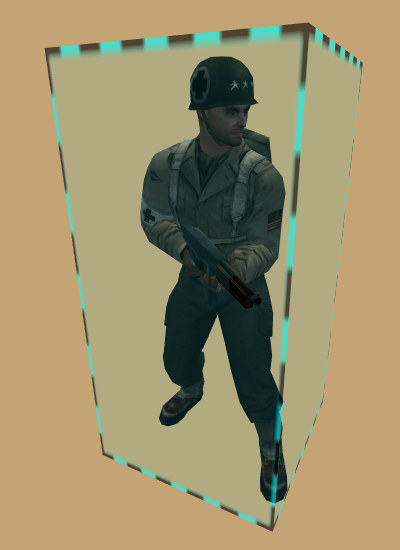
Baseline (stock) ET behavior composed of { head, torso, feet } boxes. Priority-box scoring in order of { head, feet, torso }. That is to say if a bullet can hit a player's head, regardless of whether it travels through another box on the same player such as torso, the headshot will be scored. For example, shooting a player on a ladder from below, resulst in more headshots than you might expect. This behavior is to maintain backwards-compatibility.
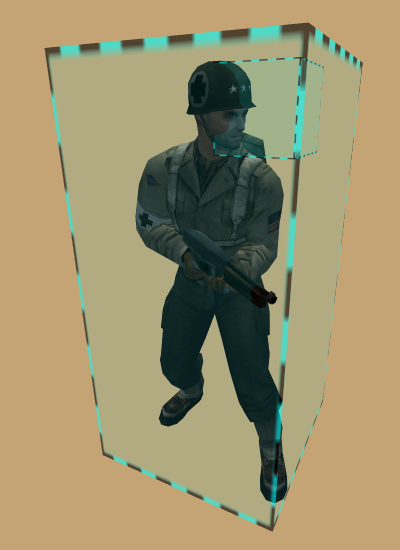
Similar but improved over etmain with { crouch, prone, playdead } adjustments for added realism. Uses priority-box scoring in order of { head, feet, torso }. This mode is somewhat similar to that of older ETPub versions.
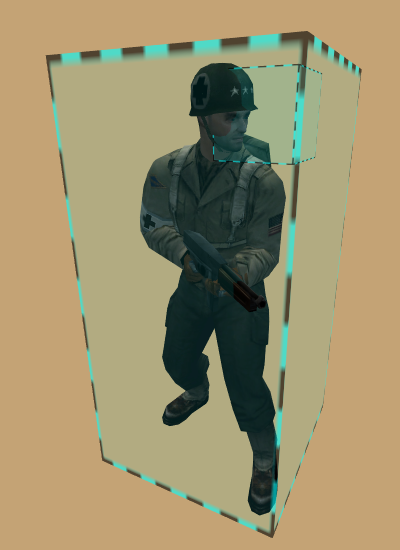
Similar but improved over basic with animation-accurate head-box. Uses priority-box scoring in order of { head, feet, torso }. This mode matches that of xmod prior to 2.1.0 version.
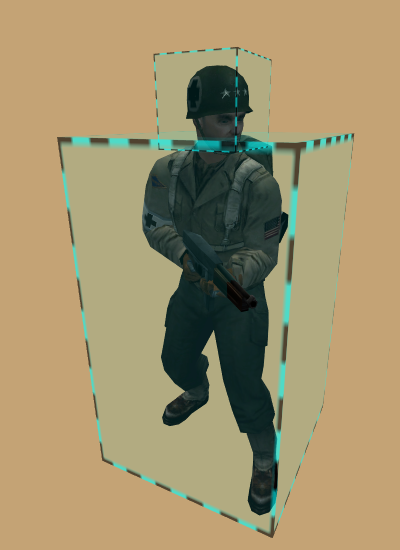
Advanced (realistic), tight behavior with head, left-arm, right-arm, left-hand, right-hand, torso(2), left-foot and right-foot boxes all tracking animation. Uses closest-box scoring, resulting in more difficult headshots when impeded by other boxes.
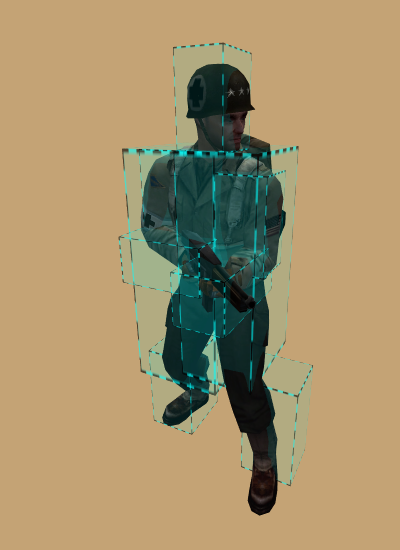
Oriented, tight behavior with head, left-arm, right-arm, left-hand, right-hand, torso, left-leg, right-leg, left-foot and right-foot boxes all tracking animation. Uses closest-box scoring, resulting in more difficult headshots when impeded by other boxes. This is the tightest and most discriminating model to date. It is unknown at this time how much CPU this mode will consume on busy servers.
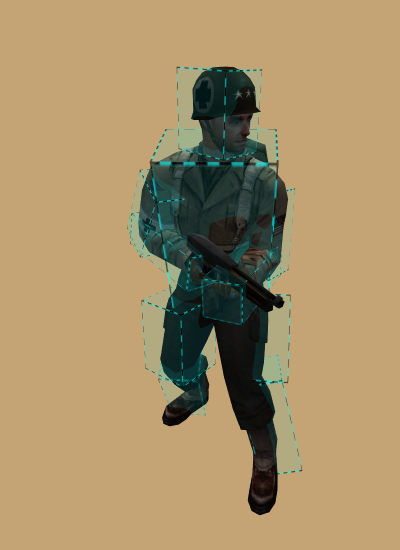
g_hitmodeAntilag — set maximum amount of antilag in milliseconds
g_hitmodeAntilag [0..1500]
g_hitmodeAntilagLerp — enable/disable antilag lerping
g_hitmodeAntilagLerp [mode]
| MODE | DESCRIPTION |
|---|---|
| 0 | disabled |
| 1 | enabled |
g_hitmodeDebug — set bitflags for hitmode debugging
g_hitmodeDebug [flags]
Table 13.18. g_hitmodeDebug Flags
| FLAG | DESCRIPTION |
|---|---|
| 1 | visually render (draw) active boxes |
| 2 | visually render (draw) reference boxes |
| 4 | visually render (draw) world-collision-box |
| 16 | log lifecycle (construct/destruct/alloc/free) to client console |
| 32 | log snapshot use to client console |
| 64 | log state changes for state-driven models to client console |
| 256 | log ray text to client console |
| 512 | log zone text to client console |
g_hitmodeDebug sets bitflags for hitmode debugging. These are expert debugging aids provided for the benefit of people who are interested in learning more detail about boxes, sizes, and how they react to player movements, and is certainly not meant to be enabled during real gameplay.
| Caution |
|---|---|
| Hitmode visuals are expensive. Each rendered box consumes a game-engine entity which is limited and adds to network traffic load. If you are not careful, high numbers of players with high rates of hits and long lifetimes may lead to entity exhaustion. Flags enabling client console logging can easily cause ET limitations to be exceeded, resulting in dropped client connections. In other words, do not create rapid hits while this kind of debugging is active. |
| Tip |
|---|---|
| Use status(1) to monitor game entities. |
g_hitmodeFat — set increased torso-box size in inches
g_hitmodeFat [-10..10]
g_hitmodeGhosting — set lifetime of hit ghosting in milliseconds
g_hitmodeGhosting [0..30000]
g_hitmodeGhosting
sets lifetime of hit ghosting in milliseconds.
A value of 0 will disable ghosting.
This a visual-debugging technique which takes a visual snapshot of a player's boxes when hit.
The boxes are drawn (frozen) in place until the duration has expired.
The box which has scored a hit is rendered in a different color.
| Caution |
|---|---|
| Hitbox visuals are not free. Each rendered box consumes an game-engine entity which is limited. If you are not careful, high numbers of players with high rates of hits and long lifetimes may lead to entity exhaustion. |
| Tip |
|---|---|
| Use status(1) to monitor game entities. |
g_hitmodeReference — set reference hitmode for comparison
g_hitmodeReference [mode]
Table 13.19. g_hitmodeReference Modes
| MODE | NAME | BOXES | BRIEF |
|---|---|---|---|
| 1 | entity | 1 | torso (body) |
| 2 | etmain | 3 | head, torso, legs |
| 3 | basic | 3 | head, torso, legs |
| 4 | standard | 3 | head, torso, legs |
| 5 | advanced | 9 | head, larm, rarm, lhand, rhand, torso(2), lfoot and rfoot |
| 6 | oriented | 10 | head, larm, rarm, lhand, rhand, torso, lleg, rleg, lfoot and rfoot |
g_hitmodeReference sets the reference hitmode to render for comparison. This feature has no effect unless the corresponding g_hitmodeDebug(cvar) flag is on.
g_hitmodeZone — set zone for debugging
g_hitmodeZone [mode]
Table 13.20. g_hitmodeZone Modes
| MODE | DESCRIPTION |
|---|---|
| 1 | body |
| 2 | head |
| 3 | left-arm |
| 4 | right-arm |
| 5 | left-hand |
| 6 | right-hand |
| 7 | torso |
| 8 | left-torso |
| 9 | right-torso |
| 10 | legs |
| 11 | left-leg |
| 12 | right-leg |
| 13 | left-foot |
| 14 | right-foot |
g_hitmodeZone set zone for debugging. This feature has no effect unless the corresponding g_hitmodeDebug(cvar) flag is on.
g_inactivity — set player inactivity limit
g_inactivity [limit]
g_intermissionReadyPercent — sets the percentage of 'readied' players needed to end intermission
g_intermissionReadyPercent [percent]
g_intermissionTime — sets the intermission duration
g_intermissionTime [period]
g_ipcomplaintlimit — set maximum number of unique complaints allowed for a player
g_ipcomplaintlimit [num]
g_kickMessage — set kick message
g_kickMessage ["text"]
g_kickMessage sets the message displayed to players when they attempt to reconnect after being kicked. If the value includes the token $TIME it will be substituted with the human-readable form of g_kickTime(cvar).
g_kickTime — set duration to ban kicked players
g_kickTime [duration]
g_kickTime sets the duration in seconds to ban kicked players. When changed, the read-only cvar sv_tempBanMessage is updated accordingly.
For convenience you may specify duration { days, hours, minutes, seconds } using their respective suffixes { d, h, m, s }. For example, to specify 10 days plus 4 hours, the following are all equivalent:
10d4h10d4h0m0s878400s878400
g_killSpreeLevels — set killing spree XP milestones
g_killSpreeLevels
" [level1] [level2] [level3] [level4] [level5] [level6]"
g_killingSpree — set killing spree mode
g_knifeonly — enable/disable knife-only game mode
g_knifeonly [mode]
| MODE | DESCRIPTION |
|---|---|
| 0 | disabled |
| 1 | enabled |
g_knifeonly enables or disables knife-only game mode.
| Note |
|---|---|
| This is a fun game mode and as such, it may not be compatible with the objectives of most maps. |
| Warning |
|---|---|
| This feature is mutually exclusive to g_knifeonly(cvar), and g_sniperWar(cvar). |
g_landminetimeout — enable/disable landmine and tripmine cleanup upon owner disconnect
g_landminetimeout [mode]
| MODE | DESCRIPTION |
|---|---|
| 0 | disabled |
| 1 | enabled |
g_levels_battlesense — graduated levels of battlesense XP
g_levels_battlesense
" [level1] [level2] [level3] [level4] [level5]"
g_levels_battlesense
defines the graduated levels of battlesense XP.
Between 1-5 integers are used to specify the amount of XP required for each level.
Omitting values will disable any of the levels higher than those specified.
A value of -1 for any skill level also disables that particular level,
although the associated skills will still be gained when reaching a higher level, if allowed.
Leaving the value blank causes the default values to be used: "20 50 90 140 200".
g_levels_covertops — graduated levels of Covert-Ops XP
g_levels_covertops
" [level1] [level2] [level3] [level4] [level5]"
g_levels_covertops
defines the graduated levels of Covert-Ops XP.
Between 1-5 integers are used to specify the amount of XP required for each level.
Omitting values will disable any of the levels higher than those specified.
A value of -1 for any skill level also disables that particular level,
although the associated skills will still be gained when reaching a higher level, if allowed.
Leaving the value blank causes the default values to be used: "20 50 90 140 200".
g_levels_engineer — graduated levels of Engineer XP
g_levels_engineer
" [level1] [level2] [level3] [level4] [level5]"
g_levels_engineer
defines the graduated levels of Engineer XP.
Between 1-5 integers are used to specify the amount of XP required for each level.
Omitting values will disable any of the levels higher than those specified.
A value of -1 for any skill level also disables that particular level,
although the associated skills will still be gained when reaching a higher level, if allowed.
Leaving the value blank causes the default values to be used: "20 50 90 140 200".
g_levels_fieldops — graduated levels of Field-Ops XP
g_levels_fieldops
" [level1] [level2] [level3] [level4] [level5]"
g_levels_fieldops
defines the graduated levels of Field-Ops XP.
Between 1-5 integers are used to specify the amount of XP required for each level.
Omitting values will disable any of the levels higher than those specified.
A value of -1 for any skill level also disables that particular level,
although the associated skills will still be gained when reaching a higher level, if allowed.
Leaving the value blank causes the default values to be used: "20 50 90 140 200".
g_levels_lightweapons — graduated levels of lightweapons XP
g_levels_lightweapons
" [level1] [level2] [level3] [level4] [level5]"
g_levels_lightweapons
defines the graduated levels of lightweapons XP.
Between 1-5 integers are used to specify the amount of XP required for each level.
Omitting values will disable any of the levels higher than those specified.
A value of -1 for any skill level also disables that particular level,
although the associated skills will still be gained when reaching a higher level, if allowed.
Leaving the value blank causes the default values to be used: "20 50 90 140 200".
g_levels_medic — graduated levels of Medic XP
g_levels_medic
" [level1] [level2] [level3] [level4] [level5]"
g_levels_medic
defines the graduated levels of Medic XP.
Between 1-5 integers are used to specify the amount of XP required for each level.
Omitting values will disable any of the levels higher than those specified.
A value of -1 for any skill level also disables that particular level,
although the associated skills will still be gained when reaching a higher level, if allowed.
Leaving the value blank causes the default values to be used: "20 50 90 140 200".
g_levels_soldier — graduated levels of Soldier XP
g_levels_soldier
" [level1] [level2] [level3] [level4] [level5]"
g_levels_soldier
defines the graduated levels of Soldier XP.
Between 1-5 integers are used to specify the amount of XP required for each level.
Omitting values will disable any of the levels higher than those specified.
A value of -1 for any skill level also disables that particular level,
although the associated skills will still be gained when reaching a higher level, if allowed.
Leaving the value blank causes the default values to be used: "20 50 90 140 200".
g_lms_followTeamOnly — enable/disable same-team spectator restriction
g_lms_followTeamOnly [mode]
| MODE | DESCRIPTION |
|---|---|
| 0 | disabled |
| 1 | enabled |
g_lms_followTeamOnly enables or disables same-team spectator restriction. When enabled players can only follow their own teammates.
| Note |
|---|---|
| This value is in effect only when LMS gametype is enabled using g_gametype(cvar). |
g_lms_lockTeams — enable/disable locked teams during match play
g_lms_lockTeams [mode]
g_lms_lockTeams enables or disables locked teams during match play. When enabled, the teams are locked once match play begins and new players may not join.
| Note |
|---|---|
| This value is in effect only when LMS gametype is enabled using g_gametype(cvar). |
g_lms_matchlimit — set maximum number of matches to play before nextmap
g_lms_matchlimit [num]
g_lms_matchlimit sets the maximum number of matches to play before moving on to the next map in rotation.
| Note |
|---|---|
| This value is in effect only when LMS gametype is enabled using g_gametype(cvar). |
g_lms_roundlimit — set maximum number of rounds to play before match ends
g_lms_roundlimit [num]
g_lms_roundlimit
sets the maximum number of rounds for a single matchup between teams.
A team is considered to win a match when more than 50% of num rounds are won.
| Important |
|---|---|
The value of num should always be an odd number.
|
| Note |
|---|---|
| This value is in effect only when LMS gametype is enabled using g_gametype(cvar). |
g_lms_teamForceBalance — enable/disable passive team balancing
g_lms_teamForceBalance [mode]
g_lms_teamForceBalance enables or disables whether the game will prevent new players from joining the team with more players than the other.
| Note |
|---|---|
| This value is in effect only when LMS gametype is enabled using g_gametype(cvar). |
g_log — set game log output file
g_log ["file"]
g_logOptions — set bitflags for log options
g_logOptions [flags]
Table 13.22. g_logOptions Flags
| FLAG | DESCRIPTION |
|---|---|
| 1 | deprecated |
| 2 | log extended weapons stats for new hitzones |
| 4 | deprecated |
| 8 | log ban events |
g_logOptions sets bitflags for log options. This setting only applies to g_log(cvar) when enabled.
g_logSync — enable/disable log file sync
g_logSync [mode]
| MODE | DESCRIPTION |
|---|---|
| 0 | disabled |
| 1 | enabled |
g_logSync
enables or disables log file synchronization (flushing) after each buffered write.
A value of "" will disable this functionality.
This setting only applies to g_log(cvar) when enabled.
g_loseSpreeLevels — set losing spree XP milestones
g_loseSpreeLevels
" [level1] [level2] [level3] [level4] [level5] [level6]"
g_mapScriptDirectory — set directory for alternative mapscripts
g_mapScriptDirectory [dir]
g_maxGameClients — sets the maximum number of players that can be in the game at one time
g_maxGameClients [num]
g_maxlives — sets maximum number of lives for all players
g_maxlives [num]
g_maxlives
sets maximum number of lives for all players.
Setting num to 0 disables max
lives enforcement and allows unlimited lives.
| Note |
|---|---|
| This cvar supercedes g_alliedmaxlives(cvar) and g_axismaxlives(cvar). |
g_maxlivesRespawnPenalty — sets the penalty for a player after their lives have run out
g_maxlivesRespawnPenalty [num]
g_medicChargeTime — set amount of time for Medic to recharge
g_medicChargeTime [duration]
g_medicSelfHealDelay — set self-healing delay for Medic in milliseconds
g_medicSelfHealDelay [period]
g_medicSelfHealDelay
sets the self-healing delay for Medic in milliseconds.
This controls how soon, if at all, a Medic may benefit from their own medpacks
(or medpacks dropped by other teammates).
A value of 0 permits immediate self-healing.
A value of -1 disables self-healing.
A positive value delays self-healing by period milliseconds.
g_medics — set bitflags for Medic behavior
g_medics [flags]
Table 13.23. g_medics Flags
| FLAG | DESCRIPTION |
|---|---|
| 4 | regenerate normal health at 2HP/s, and bonus health at 1HP/s. |
| 8 | completely disable health regeneration |
| 16 | share adrenaline |
| 32 | pause health regeneration for 5 seconds after the player has taken damage |
g_misc — set various bitflags
g_misc [flags]
Table 13.24. g_misc Flags
| FLAG | DESCRIPTION |
|---|---|
| 1 | binoc-war - enables binocular pickup stats |
| 2 | only admins (admin level 1 or higher) can connect to server |
| 4 | players can throw health/ammo packs vertically |
| 8 | level-4 battle-sense revivees get full health |
| 16 | more realistic weapons aim-spread, factoring player crouch/prone, slick-surfaces and water |
| 32 | Do not give XP to players who kill someone who has been inactive for more than 30 seconds |
| 64 | Do not give XP for med packs |
| 128 | Do not give XP for ammo packs |
| 256 | Visible enemy landmines (Battle sense level 4) will be transparent red/blue instead of the usual transparent white texture |
| 512 | Enable realistic lean animation (Attention this will be forced if g_weapons flag 8 is enabled!) |
| 1024 | Players who drown can't be revived |
g_muteTime — specifies how long a mute should last
g_muteTime [period]
g_muteTime
specifies how long a mute should last. period set to 0 makes
mutes permanent (until they are unmuted), while any value above sets the amount of time the player is muted.
For convenience you may specify { days, hours, minutes, seconds } using their respective suffixes { d, h, m, s }. For example, to specify 1 day plus 4 hours, the following are all equivalent:
1d4h1d4h0m0s100800s100800
g_noTeamSwitching — disables team switching during a match
g_noTeamSwitching [mode]
| MODE | DESCRIPTION |
|---|---|
| 0 | disabled |
| 1 | enabled |
g_packDistance — sets the multiplier of throw distance for ammo and health packs
g_packDistance [num]
g_panzerWar — enable/disable panzer-war game mode
g_panzerWar [mode]
| MODE | DESCRIPTION |
|---|---|
| 0 | disabled |
| 1 | enabled |
g_panzerWar enables or disables panzer-war game mode.
When enabled, the following is in effect:
| Note |
|---|---|
| This is a fun game mode and as such, it may not be compatible with the objectives of most maps. |
| Warning |
|---|---|
| This feature is mutually exclusive to g_knifeonly(cvar), and g_sniperWar(cvar). |
g_playDead — enables players to play dead
g_playDead [mode]
| MODE | DESCRIPTION |
|---|---|
| 0 | disabled |
| 1 | enabled |
g_playDead enables players to play dead.
Playdead allows a player to fake being dead in the hopes an attacker will give them no further attention and kindly move on. You can use this feature by binding a key for it in the in-game xmod menu under Misc. The key you specify will toggle playdead mode.
When you are in playdead mode, you cannot shoot your weapon. To an enemy, you look like a dead player (after a tap-out and awaiting a respawn). However, you will still be a solid body (players cannot walk through you) and your eyes will still blink.
| Note |
|---|---|
| Note that this version of playdead is a bit less bugged than Shrubmod’s version. It’s much harder to get stuck in walls, and there’s just about zero chance of someone using this as an exploit to get through a wall (example, bank doors on Goldrush) due to extra checks to make sure there is enough clearance for your player to fall down and still be in the “world”. |
| Tip |
|---|---|
| This is an excellent way to infiltrate enemy bases and maintain the element of surprise! |
g_poisonSyringes — enables the use of poison syringes
g_poisonSyringes [mode]
| MODE | DESCRIPTION |
|---|---|
| 0 | disabled |
| 1 | enabled |
g_poisonSyringes enables the use of poison syringes.
Poison syringes are added to weapon slot #4 (behind grenades). It is a blue colored syringe that you can poke enemies with (or friendlies when friendly-fire enabled). When poked with a poison syringe, your view will start swaying back and forth, and get distorted. You can hear your heart pounding. Better find help. This option is enabled on the server using g_poisonSyringes(cvar).
Compounding effect - that is, if you are poked multiple times, you loose health faster. This allows XP sharing with poison hits – if you poke someone with a poison syringe, you will get XP for every time damage is dealt until they die. The interval of time that your syringe damages the player is 1.5 seconds, so every 1.5 seconds you will get 0.2 Medic XP and hurt the player 10HP. Since it tracks multiple people hitting the player with a Poison Syringe, the last poison damage inflicted that causes the death of the player gives the person who hit them with the specific syringe that caused the death a final 3 Medic XP.
Poisoned players can be cured with health packs. However, in an effort to make the game more balanced, medics cannot self-antidote. Essentially, a player can antidote themselves by finding a health pack that is not their own. Since poison compounds, you must find a health pack for each time you have been poisoned. For example, if you have been poked 4 times with a syringe, you must find 4 health packs.
| Tip |
|---|---|
| Health cabinets provide a good source of health packs. |
g_privateMessages — enables private messaging
g_privateMessages [mode]
| MODE | DESCRIPTION |
|---|---|
| 0 | disabled |
| 1 | enabled |
g_proneDelay — enable/disable extended prone dela
g_proneDelay [mode]
| MODE | DESCRIPTION |
|---|---|
| 0 | disabled |
| 1 | enabled |
g_proneDelay enables or disables penalties to players who go prone. By default, players had to wait 750 milliseconds between going prone and standing back up with no penalty to their accuracy. With this cvar enabled, players will have an additional delay of 1 second (1750 milliseconds total) before they can stand up, and their aim spread will be maximized during this period as well.
g_protestMessage — sets a short footer message for players disconnected as punishment.
g_protestMessage [message]
g_redlimbotime — the amount of time between Axis team respawns
g_redlimbotime [interval]
g_redlimbotime specifies the time interval in milliseconds between Axis respawns. This cvar is used for the actual calculations in-game and is latched, meaning it cannot be changed during a match. Mapscripts set this cvar, and the g_userAxisRespawnTime(cvar) cvar overrides this as well. Consequently, g_userAxisRespawnTime(cvar) should be used to set custom spawn times, and this cvar should not be used at all.
g_reflectFriendlyFire — sets the percentage of friendly fire to reflect to the attacker
g_reflectFriendlyFire [percent]
g_saveCampaignStats — enables persistent stats across all the maps in a campaign
g_saveCampaignStats [mode]
| MODE | DESCRIPTION |
|---|---|
| 0 | disabled |
| 1 | enabled |
g_scriptDebug — enables debug of map script parsing
g_scriptDebug [mode]
| MODE | DESCRIPTION |
|---|---|
| 0 | disabled |
| 1 | enabled |
g_shortcuts — enable/disable text shortcuts
g_shortcuts [mode]
| MODE | DESCRIPTION |
|---|---|
| 0 | disabled |
| 1 | enabled |
g_shoutcastpassword — set password for clients to use shoutcasting
g_shoutcastpassword ["secret"]
g_shove — set player shoving distance
g_shove [distance]
g_shove
sets the distance a player is shoved.
The amount specifies the distance a player is shoved and you should experiment with different
values until obtaining the desired results.
A value of 0 disables player shoving.
A value of 100 might be a good starting point to start tuning this feature.
g_shoveNoZ — enable/disable supression of Z-axis shoving
g_shoveNoZ [mode]
| MODE | DESCRIPTION |
|---|---|
| 0 | disabled |
| 1 | enabled |
g_shoveNoZ enables or disables supression of Z-axis shoving. When enabled, shoving in the vertical up/down direction is supressed, and typically meant to help reduce shove-boosting and other tactics when they are undesired.
| Note |
|---|---|
| g_shove(cvar) must be enabled for this variable to take effect. |
| Warning |
|---|---|
| Disabling this feature can greatly alter gameplay, as it allows new and unexpected ways of winning objectives. |
g_sk5_cvops — set bitflags for 5th-level Covert-Ops skill
g_sk5_eng — set bitflags for 5th-level Engineer skill
g_sk5_medic — set bitflags for 5th-level Medic skill
g_sk5_soldier — set bitflags for 5th-level Soldier skill
g_skills — set bitflags for skills related behavior
g_slashKill — set client /kill behavior mode
g_smoothClients — enable/disable missed client frames smoothing
g_smoothClients [mode]
| MODE | DESCRIPTION |
|---|---|
| 0 | disabled |
| 1 | enabled |
g_snap — set bitflags for server floating point value snapping
g_snap [flags]
Table 13.34. g_snap Flags
| FLAG | DESCRIPTION |
|---|---|
| 1 | round player state at end of frame |
| 2 | round player state during client-think |
| 4 | round player state during client smoothing extrapolation |
g_snap sets bitflags for server floating point value snapping. Generally you do not need to touch this setting but under certain circumstances, the tweaking of this value can help conserve network bandwidth at the cost of sub-inch, and sub-degree accuracy of certain pieces of information transmitted to clients.
| Caution |
|---|---|
| These are expert settings and should not be tweaked without guidance from xmod developers. |
g_sniperWar — enable/disable sniper-war game mode
g_sniperWar [mode]
| MODE | DESCRIPTION |
|---|---|
| 0 | disabled |
| 1 | enabled |
g_sniperWar enables or disables sniper-war game mode.
When enabled, the following is in effect:
| Note |
|---|---|
| This is a fun game mode and as such, it may not be compatible with the objectives of most maps. |
| Warning |
|---|---|
| This feature is mutually exclusive to g_knifeonly(cvar), and g_panzerWar(cvar). |
g_soldierChargeTime — set amount of time for Soldier to recharge
g_soldierChargeTime [duration]
g_spectator — set bitflags for spectator actions
g_spectatorInactivity — set spectator inactivity limit
g_spectatorInactivity [limit]
g_teamDamageMinHits — set friendly-fire tolerance minimum hits
g_teamDamageMinHits [num]
g_teamDamageMinHits sets the minimum number of hits required before friendly-fire tolerance is in effect. This variable is only used when g_teamDamageRestriction(cvar) is enabled.
g_teamDamageRestriction — set friendly-fire tolerance percentage
g_teamDamageRestriction [tolerance]
g_teamDamageRestriction
sets friendly-fire tolerance percentage.
A player's friendly-fire is calculated as hits against friendlies as compared to total hits.
A value of 1 to 100 inclusive will set the tolerance limit
of fiendly-fire and when exceeded, the player will be kicked.
A value of 0 disables this feature.
g_teamForceBalance — force team balance
g_teamForceBalance [mode]
| MODE | DESCRIPTION |
|---|---|
| 0 | disabled |
| 1 | enabled |
g_truePing — enable/disable true ping calculation
g_truePing [mode]
| MODE | DESCRIPTION |
|---|---|
| 0 | disabled |
| 1 | enabled |
g_truePing enables or disables true ping calculation. When enabled, ping is calculated by averaging the timestamps of commands sent by clients. This is a better way of calculating latency between the client and server. Though it does not affect actual lag or performance, ping numbers will usually be higher with this turned on. Keep this in mind when kicking players for high ping. This has no impact of any kind on antilag support.
g_userAlliedRespawnTime — the amount of time between Allied team respawns
g_userAlliedRespawnTime [interval]
g_userAlliedRespawnTime specifies the time interval in seconds between Allied respawns. This cvar is used for custom spawn times -- that is, it overrides the time set in the map's script. It automatically updates the g_bluelimbotime(cvar) cvar accordingly.
g_userAxisRespawnTime — the amount of time between Axis team respawns
g_userAxisRespawnTime [interval]
g_userAxisRespawnTime specifies the time interval in seconds between Axis respawns. This cvar is used for custom spawn times -- that is, it overrides the time set in the map's script. It automatically updates the g_redlimbotime(cvar) cvar accordingly.
g_voiceChatsAllowed — set maximum number of voice chats per 30 second period
g_voiceChatsAllowed [num]
g_watermark — set server watermark used for client display
g_watermark [ "image" | "shader" ]
g_watermark
sets the sever watermark used for client display.
An empty value "" will disable watermarking.
Watermarks can be either an image or a shader.
An image is either in .tga or .jpg format.
A .tga file is useful when alpha-channels for transparency effects are desired,
(as long as you save them as 32-bit targa format).
| Important |
|---|---|
| The image pixel dimensions must be a power-of-2. Square images of { 32x32, 64x64 or 128x128 } pixels are good for watermarking. Images such as { 30x30, 20x20, 128x100 } are all bad and will not be loaded by ET. |
A shader gives many more advanced options. An example shader:
// shader name
watermark/bluecherry/bc
{
    nocompress
    nomipmaps
    nopicmip
    {
        // image filename
        map watermark/bluecherry/bc.tga
        blendFunc blend
        rgbGen vertex
        alphaGen vertex
    }
}
Of course, replace bluecherry/bc.tga with your actual file name.
When you set a watermark, the game will requires that it be placed in the watermark/
subdirectory. For example, g_watermark “clanfu.jpg” will attempt to load
watermark/clanfu.jpg. Make sure you remember this when you make your .pk3.
For more information on using watermarks, check out Rain's post on ETPro forums.
g_watermarkFadeAfter — set amount of time before watermark begins to fade
g_watermarkFadeAfter [period]
g_watermarkFadeTime — set amount of time to fade watermark
g_watermarkFadeTime [period]
g_weapons — set bitflags for various weapons behavior
g_weapons [flags]
Table 13.37. g_weapons Flags
| FLAG | DESCRIPTION |
|---|---|
| 1 | Disable Sten overheating |
| 2 | Disable Mobile MG42 overheating |
| 4 | Allow headshots with Mobile MG42 |
| 8 | Allow players to fire while leaning (1st person view and 3rd person animation are modified if this option is enabled) |
| 16 | Allow Medics and Engineers to pick Sten in limbo |
| 32 | Fire underwater (except flamers, panzers, rifle grenades, mortars and MG42) |
| 64 | Field-Ops with level 0 battle-sense do not spawn with binoculars |
| 128 | syringes function underwater |
| 256 | pliers function underwater |
| 512 | Level 5 Engineers will spawn with a Bomb. - Looks like a red smoke bomb, but does as much damage as a dynamite and explodes in 4 seconds. Only 1 per life |
| 1024 | Level 5 Engineers' landmines inflict +15% damage |
| 2048 | Allow Engineer's "Bomb" to damage movers (trucks, tanks, etc.) |
| 4096 | "Too many air strikes requested" will restore used charge bar |
| 8192 | "Too many air strikes requested" will restore half of used charge bar |
| 16384 | ammo packs restore a lost helmet |
| 32768 | players with binoculars drop them upon death |
| 65536 | allies reload rifles mid-clip to match corresponding axis ability |
| 131072 | Enable fast shooting for MP40, Thompson and Sten (delay between rounds lowered from 150ms to 110ms) |
| 262144 | Knife can get headshots |
| 524288 | Throwing knife can get headshots |
| 1048576 | enable poison throwing knives |
| 2097152 | disable adrenaline |
g_weaponsenable — enable/disable special weapons
g_wolfrof — enable/disable Return to Castle Wolfenstein rate of fire
g_wolfrof [mode]
| MODE | DESCRIPTION |
|---|---|
| 0 | disabled |
| 1 | enabled |
g_xpCap — set XP-limit action
g_xpMax — set XP-limit amount
g_xpMax [0..999999]
g_xpMax
sets the XP-limit amount.
A value of 0 will disable limiting.
If a positive value, the server will take action when the limit is exceeded.
The action is specified by g_xpCap(cvar).
g_xpSave — enable/disable XP-save feature
g_xpSave [mode]
Table 13.40. g_xpSave Modes
| MODE | DESCRIPTION |
|---|---|
| 0 | disabled |
| 1 | enabled |
| 2 | enabled and clear all XP in campaign mode when a new campaign begins |
g_xpSave enables or disables XP-save functionality. If enabled, the server will save XP for up to the amount of time specified by g_xpSaveTimeout(cvar).
g_xpSaveTimeout — set XP-save duration
g_xpSaveTimeout [duration]
g_xpSaveTimeout
sets the XP-save duration in seconds.
A value of 0 specifies XP-save will never timeout.
For convenience you may specify duration { days, hours, minutes, seconds } using their respective suffixes { d, h, m, s }. For example, to specify 10 days plus 4 hours, the following are all equivalent:
10d4h10d4h0m0s878400s878400
match_latejoin — enable/disable allowing players to join a match in progress
match_latejoin [mode]
| MODE | DESCRIPTION |
|---|---|
| 0 | disabled |
| 1 | enabled |
match_minplayers — set minimum number of players required for match to begin
match_minplayers [num]
match_mutespecs — enable/disable muting of spectators
match_mutespecs [mode]
| MODE | DESCRIPTION |
|---|---|
| 0 | disabled |
| 1 | enabled |
match_readypercent — set percentage of players required to be ready
match_readypercent [percent]
match_timeoutcount — set maximum number of times non-referees can pause the match
match_timeoutcount [num]
match_warmupDamage — enable/disable damage during warmup
match_warmupDamage [mode]
| MODE | DESCRIPTION |
|---|---|
| 0 | disabled |
| 1 | enabled |
omnibot_enable — enable/disable Omni-bot module
omnibot_enable [mode]
| MODE | DESCRIPTION |
|---|---|
| 0 | disabled |
| 1 | enabled |
omnibot_enable enables or disables Omni-bot module loading at game init time. When enabled, xmod will attempt to load the Omni-bot module. If the module is not found, a small error message will be logged indicating such, and xmod will continue to operate as if Omni-bot was disabled. If you do not wish to operate Omni-bot but wish to supress a loading attempt and subsequent error message, then disable this feature.
| Note |
|---|---|
This CVAR should be set on the server command-line and not in a .cfg file.
|
sv_allowDownload — enable/disable direct client download
sv_allowDownload [mode]
| MODE | DESCRIPTION |
|---|---|
| 0 | disabled |
| 1 | enabled |
sv_floodProtect — enable/disable client commands flood protection
sv_floodProtect [mode]
| MODE | DESCRIPTION |
|---|---|
| 0 | disabled |
| 1 | enabled |
sv_hostname — set name of server shown in browse lists
sv_hostname ["name"]
sv_hostname sets the name of the server as shown in browse lists. In order for this value to have effect, the appropriate setting for dedicated(cvar) must be in effect.
sv_lanForceRate — enable/disable automatic network settings for LAN clients
sv_lanForceRate [mode]
| MODE | DESCRIPTION |
|---|---|
| 0 | disabled |
| 1 | enabled |
sv_master2 — set supplemental master server for browse-list registration
sv_master2 ["hostname"]
sv_master3 — set supplemental master server for browse-list registration
sv_master3 ["hostname"]
sv_master4 — set supplemental master server for browse-list registration
sv_master4 ["hostname"]
sv_master5 — set supplemental master server for browse-list registration
sv_master5 ["hostname"]
sv_maxPing — set maximum allowable client ping
sv_maxPing [ping]
sv_maxPing
sets the maximum ping in milliseconds allowable for a client, checked at time of connecting.
At connecting time the client ping is usually significantly worse than at normal gameplay,
therefore this setting might need to be inflated to compensate.
The server enforces this limit by rejecting client connections exceeding ping.
A value of 0 disables this functionality.
sv_maxclients — set maximum number of connected clients
sv_maxclients [num]
sv_minPing — set minimum required client ping
sv_minPing [ping]
sv_minPing
sets the minimum ping in milliseconds required for client connectivity, checked at time of connecting.
At connecting time the client ping is usually significantly worse than at normal gameplay,
therefore this setting might need to be inflated to compensate.
The server enforces this limit by rejecting client connections with a lower ping.
A value of 0 disables this functionality.
This feature is probably only useful for dial-up and other high-latency/low-bandiwdth connections.
sv_packetdelay — set simulated server latency
sv_packetdelay [delay]
sv_packetloss — set simulated server packet loss
sv_packetloss [loss]
sv_privateClients — set number of reserved client slots
sv_privateClients [num]
sv_privatePassword — set password for reserved private player slots
sv_privatePassword ["secret"]
sv_pure — enable/disable client purity check
sv_pure [mode]
| MODE | DESCRIPTION |
|---|---|
| 0 | disabled |
| 1 | enabled |
sv_reconnectlimit — set minimum period required between client reconnections
sv_reconnectlimit [period]
sv_showloss — enable/disable lost usercmd logging
sv_showloss [mode]
| MODE | DESCRIPTION |
|---|---|
| 0 | disabled |
| 1 | enabled |
sv_wwwBaseURL — set URL download prefix for WWW downloads of server files
sv_wwwBaseURL ["URL"]
sv_wwwDlDisconnected — enable/disable client disconect while downloading
sv_wwwDlDisconnected [mode]
| MODE | DESCRIPTION |
|---|---|
| 0 | disabled |
| 1 | enabled |
sv_wwwDownload — enable/disable HTTP download
sv_wwwDownload [mode]
| MODE | DESCRIPTION |
|---|---|
| 0 | disabled |
| 1 | enabled |
sv_wwwDownload enables or disables HTTP downloads. If enabled takes precedence over sv_allowDownload(cvar).
sv_wwwFallbackURL — set URL for failed WWW downloads
sv_wwwFallbackURL ["URL"]
sv_wwwFallbackURL
sets the URL for failed WWW downloads.
Clients will attempt to open the page specified by URL upon failing a download.
If an empty "" is specified and the download fails, then the client will fallback
to the standard download mechanism controlled via sv_allowDownload(cvar).
team_maxArtillery — sets the maximum number of artillery or airstrikes per minute
team_maxArtillery [num]
team_maxArtillery
sets the maximum number of artillery or airstrikes each team can have per minute.
Setting num to 0 disables artillery and airstrikes altogether,
and 1 through to 6 specifies the maximum number of concurrent airstrikes
per minute allowed. Anything above 6 will have no effect.
team_maxCovertOps — sets the maximum number of covert-ops per team
team_maxCovertOps [num]
team_maxCovertOps [num%]
team_maxCovertOps
sets the maximum number of covert-ops each team can have at once.
Setting num to -1 allows for unlimited covert-ops.
Setting num to 0 disables the class altogether,
and 1 or higher specifies the maximum number of covert-ops per team.
If desired, the maximum can be specified as a percentage of team players by suffixing
num with a percent-symbol.
team_maxEngineers — sets the maximum number of engineers per team
team_maxEngineers [num]
team_maxEngineers [num%]
team_maxEngineers
sets the maximum number of engineers each team can have at once.
Setting num to -1 allows for unlimited engineers.
Setting num to 0 disables the class altogether,
and 1 or higher specifies the maximum number of engineers per team.
If desired, the maximum can be specified as a percentage of team players by suffixing
num with a percent-symbol.
team_maxFieldOps — sets the maximum number of field-ops per team
team_maxFieldOps [num]
team_maxFieldOps [num%]
team_maxFieldOps
sets the maximum number of field-ops each team can have at once.
Setting num to -1 allows for unlimited field-ops.
Setting num to 0 disables the class altogether,
and 1 or higher specifies the maximum number of field-ops per team.
If desired, the maximum can be specified as a percentage of team players by suffixing
num with a percent-symbol.
team_maxFlamers — sets the maximum number of flamethrowers per team
team_maxFlamers [num]
team_maxFlamers [num%]
team_maxFlamers
sets the maximum number of flamethrowers each team can have at once.
Setting num to -1 allows for unlimited flamethrowers.
Setting num to 0 disables the weapon altogether,
and 1 or higher specifies the maximum number of flamethrowers per team.
If desired, the maximum can be specified as a percentage of team players by suffixing
num with a percent-symbol.
team_maxGrenLaunchers — sets the maximum number of grenade launchers per team
team_maxGrenLaunchers [num]
team_maxGrenLaunchers [num%]
team_maxGrenLaunchers
sets the maximum number of grenade launchers each team can have at once.
Setting num to -1 allows for unlimited grenade launchers.
Setting num to 0 disables the weapon altogether,
and 1 or higher specifies the maximum number of grenade launchers per team.
If desired, the maximum can be specified as a percentage of team players by suffixing
num with a percent-symbol.
team_maxLandMines — sets the maximum numbers or landmines per team
team_maxLandMines [num]
team_maxM97s — sets the maximum number of M97s per team
team_maxM97s [num]
team_maxM97s [num%]
team_maxM97s
sets the maximum number of M97s each team can have at once.
Setting num to -1 allows for unlimited M97s.
Setting num to 0 disables the weapon altogether,
and 1 or higher specifies the maximum number of M97s per team.
If desired, the maximum can be specified as a percentage of team players by suffixing
num with a percent-symbol.
team_maxMG42s — sets the maximum number of MG42s per team
team_maxMG42s [num]
team_maxMG42s [num%]
team_maxMG42s
sets the maximum number of MG42s each team can have at once.
Setting num to -1 allows for allows for unlimited MG42s.
Setting num to 0 disables the weapon altogether,
and 1 or higher specifies the maximum number of MG42s per team.
If desired, the maximum can be specified as a percentage of team players by suffixing
num with a percent-symbol.
team_maxMedics — sets the maximum number of medics per team
team_maxMedics [num]
team_maxMedics [num%]
team_maxMedics
sets the maximum number of medics each team can have at once.
Setting num to -1 allows for unlimited medics.
Setting num to 0 disables the class altogether,
and 1 or higher specifies the maximum number of medics per team.
If desired, the maximum can be specified as a percentage of team players by suffixing
num with a percent-symbol.
team_maxMortars — sets the maximum number of mortars per team
team_maxMortars [num]
team_maxMortars [num%]
team_maxMortars
sets the maximum number of mortars each team can have at once.
Setting num to -1 allows for unlimited mortars.
Setting num to 0 disables the weapon altogether,
and 1 or higher specifies the maximum number of mortars per team.
If desired, the maximum can be specified as a percentage of team players by suffixing
num with a percent-symbol.
team_maxPanzers — sets maximum number of panzerfausts per team
team_maxPanzers [num]
team_maxPanzers [num%]
team_maxPanzers
sets the maximum number of panzerfausts each team can have at once.
Setting num to -1 allows for unlimited panzerfausts.
Setting num to 0 disables the weapon altogether,
and 1 or higher specifies the maximum number of panzerfausts per team.
If desired, the maximum can be specified as a percentage of team players by suffixing
num with a percent-symbol.
team_nocontrols — enable/disable arbitrary control of teams
team_nocontrols [mode]
| MODE | DESCRIPTION |
|---|---|
| 0 | disabled |
| 1 | enabled |
vote_allow_balancedteams — enable/disable balanced teams
vote_allow_balancedteams [mode]
| MODE | DESCRIPTION |
|---|---|
| 0 | disabled |
| 1 | enabled |
vote_allow_comp — enable/disable competition settings
vote_allow_comp [mode]
| MODE | DESCRIPTION |
|---|---|
| 0 | disabled |
| 1 | enabled |
vote_allow_friendlyfire — enable/disable friendly-fire
vote_allow_friendlyfire [mode]
| MODE | DESCRIPTION |
|---|---|
| 0 | disabled |
| 1 | enabled |
vote_allow_gametype — enable/disable gametype
vote_allow_gametype [mode]
| MODE | DESCRIPTION |
|---|---|
| 0 | disabled |
| 1 | enabled |
vote_allow_generic — enable/disable generic
vote_allow_generic [mode]
| MODE | DESCRIPTION |
|---|---|
| 0 | disabled |
| 1 | enabled |
vote_allow_kick — enable/disable kick
vote_allow_kick [mode]
| MODE | DESCRIPTION |
|---|---|
| 0 | disabled |
| 1 | enabled |
vote_allow_map — enable/disable map
vote_allow_map [mode]
| MODE | DESCRIPTION |
|---|---|
| 0 | disabled |
| 1 | enabled |
vote_allow_matchreset — enable/disable matchreset
vote_allow_matchreset [mode]
| MODE | DESCRIPTION |
|---|---|
| 0 | disabled |
| 1 | enabled |
vote_allow_matchrestart — enable/disable matchrestart
vote_allow_matchrestart [mode]
| MODE | DESCRIPTION |
|---|---|
| 0 | disabled |
| 1 | enabled |
vote_allow_mutespecs — enable/disable mutespecs
vote_allow_mutespecs [mode]
| MODE | DESCRIPTION |
|---|---|
| 0 | disabled |
| 1 | enabled |
vote_allow_muting — enable/disable muting
vote_allow_muting [mode]
| MODE | DESCRIPTION |
|---|---|
| 0 | disabled |
| 1 | enabled |
vote_allow_nextmap — enable/disable nextmap
vote_allow_nextmap [mode]
| MODE | DESCRIPTION |
|---|---|
| 0 | disabled |
| 1 | enabled |
vote_allow_pub — enable/disable pub
vote_allow_pub [mode]
| MODE | DESCRIPTION |
|---|---|
| 0 | disabled |
| 1 | enabled |
vote_allow_referee — enable/disable referee
vote_allow_referee [mode]
| MODE | DESCRIPTION |
|---|---|
| 0 | disabled |
| 1 | enabled |
vote_allow_shuffleteamsxp — enable/disable shuffleteamsxp
vote_allow_shuffleteamsxp [mode]
| MODE | DESCRIPTION |
|---|---|
| 0 | disabled |
| 1 | enabled |
vote_allow_swapteams — enable/disable swapteams
vote_allow_swapteams [mode]
| MODE | DESCRIPTION |
|---|---|
| 0 | disabled |
| 1 | enabled |
vote_allow_timelimit — enable/disable timelimit
vote_allow_timelimit [mode]
| MODE | DESCRIPTION |
|---|---|
| 0 | disabled |
| 1 | enabled |
vote_allow_warmupdamage — enable/disable warmupdamage
vote_allow_warmupdamage [mode]
| MODE | DESCRIPTION |
|---|---|
| 0 | disabled |
| 1 | enabled |
Table of Contents
4 of g_spectator(cvar) enabled.
First and foremost, the most humble and sincere thanks go to everyone at Clan FU for their help and participation in the development and testing of this mod. Without their generous support, this mod would not be in existence. My utmost, sincere thanks and appreciation go to Zinx Verituse, Bani, and Forty for their contributions. Many, many thanks to Mr.Mxyzptlk for his cross-platform build/release system, C++ conversion, generated document system and continued work on the mod. Thanks to Meyerinchains for his contribution of the M97 model and animations. Thanks to Jeremy “Dr. Evil” Swigart and the magic of the Omni-bot team for their continued help with the implementation and debugging support of Omni-bot in xmod. Thanks at Lazyphreak at the xmod forums for taking the time to get all the original Shrub flags. Thanks to ETPub for the contribution to the ET community in general. xmod incorporates modified bits of code from their project. There are several server admins that frequent the xmod forums assisting those that require it without hesitation or commission. They simply choose to contribute, and for that I thank all of you and hope you will continue what you do. Thanks to SplashDamage® for taking the time to develop and release an incredible free id Software® based game. They have made a good many fan because of their generosity and dedication to the gaming community. Thanks to the SplashDamage forums community for the help they provide to everyone wanting to mod for ET. | ||
| --Jaybird | ||